AXIOM 8GBS421BS3A15 Laptop Ram Memory 2RX8S PC4-17000S-15 DDR4-2133
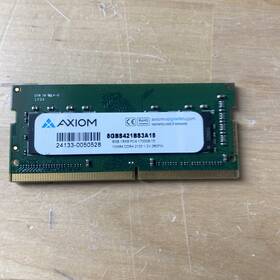
( Brand: Axiom ), ( Manufacturer Part Number: 8GBS421BS3A15 ), ( Total Capacity: 8 Gb ), ( Form Factor: So-dimm ), ( Type: Ddr4 Dram ), ( Manufacturer Warranty: Lifetime ), ( Number Of Pins: 260 ), ( Bus Speed: Pc4-17000 ), ( Country Of Origin: China )
Review AXIOM 8gb Ddr4-2133 Laptop Ram Memory
The **Axiom Memory AXIOM 8GB DDR4-2133 (PC4-17000S-15) 2Rx8 SO-DIMM** is a high-performance, low-latency memory module meticulously engineered to elevate the speed, responsiveness, and overall efficiency of modern laptops and ultrabooks. Designed with precision for compatibility with a wide range of 2015 and newer Intel-based systems, this **8GB (2Rx8) DDR4 SODIMM** delivers seamless multitasking, enhanced gaming performance, and smoother productivity workflows by leveraging its **2133 MHz (DDR4-2133) clock speed**. The **PC4-17000S-15** designation signifies its adherence to strict memory standards, ensuring optimal data transfer rates of **17.0 GB/s**, which is critical for applications demanding rapid data access, such as video editing, 3D rendering, and high-end computing tasks. Built with **low-power, high-efficiency components**, this module is ideal for laptops where thermal management and energy efficiency are paramount, reducing heat output while maintaining peak performance. The **2Rx8 configuration** (two ranks of 4GB each) balances capacity and bandwidth, providing a robust foundation for both everyday computing and more demanding workloads. Whether upgrading an older laptop to extend its lifespan or optimizing a newer system for professional or recreational use, this memory module offers a reliable, future-proof solution that enhances both speed and stability without compromising on quality. Its **industry-standard SODIMM form factor** ensures easy installation, while its **compatibility with a broad spectrum of Intel-based laptops** makes it a versatile choice for users seeking to maximize their device s potential.
### **Pros and Cons of buying a Axiom 8GB DDR4-2133 RAM (PC4-17000S-15, 2x4GB, CL15, 1.5V)**
#### **Pros:**1. **Compatibility with Modern Laptops** DDR4-2133 is a widely supported memory standard, making it suitable for most mid-to-high-end laptops released in the last decade (2015 2023). It works well with Intel (8th Gen and later) and AMD (Ryzen 2000 and later) processors.
2. **Sufficient Capacity for Basic to Moderate Use** 8GB is adequate for everyday tasks like web browsing, office applications, light multitasking, and entry-level productivity. It may handle light gaming (e.g., older titles or low settings) and basic video editing, though performance will be limited.
3. **Low Power Consumption (1.5V)** The 1.5V voltage rating suggests it s designed for efficiency, which is beneficial for laptops where battery life is a concern. This can help reduce heat and power draw compared to higher-voltage modules.
4. **Affordable Upgrade Option** If your laptop has open memory slots, this is a cost-effective way to upgrade from stock (often 4GB or 8GB non-upgradable) without needing a full system refresh.
5. **CL15 Timing** A CAS latency of 15 is reasonable for DDR4, balancing speed and stability. While not the fastest (lower CL numbers like 13 or 14 are better for performance), it won t cause bottlenecks in most use cases.
6. **PC4-17000S-15 Rating** The "S" suffix indicates it s a "Server" grade module, which typically means better reliability and endurance than consumer-grade RAM. This can be useful if you plan to use the laptop for extended periods or in demanding workloads.
7. **Easy to Install** Most laptops with two memory slots can accommodate this module without requiring soldering or specialized tools (though some ultrabooks may have soldered RAM).
---
#### **Cons:**1. **Limited Performance for Modern Demands** 8GB is the absolute minimum for smooth operation in 2024. Modern applications (e.g., Adobe Creative Suite, advanced video editing, 3D rendering, or newer AAA games) will struggle with this amount of RAM, leading to frequent slowdowns, crashes, or forced background process termination. Even light multitasking (e.g., multiple browser tabs apps) may cause lag.
2. **Not Future-Proof** If you plan to keep the laptop for 3 5 years, 8GB will quickly become insufficient. Upgrading to 16GB or 32GB would be a better long-term investment, especially for productivity or content creation.
3. **Potential Bottleneck with High-End CPUs** If your laptop has a powerful CPU (e.g., Intel i7/i9 or AMD Ryzen 7/9), the RAM will likely become the weak link, limiting overall system performance.
4. **May Not Support Higher Speeds** Some laptops allow overclocking or use faster RAM (e.g., DDR4-2400 or DDR4-3200). If your laptop is limited to 2133MHz, you won t benefit from faster modules, which could be a drawback if you later upgrade to a more powerful system.
5. **Quality and Reliability Concerns** While the "S" suffix suggests better quality, budget RAM (even from reputable brands) can sometimes have inconsistent performance or failure rates over time. Always buy from trusted sellers to avoid counterfeit or defective units.
6. **No Error Correction (ECC)** This is standard consumer RAM, lacking ECC (Error-Correcting Code) memory, which is critical for servers or mission-critical workloads where data integrity is paramount.
7. **Laptop-Specific Limitations** Some laptops (especially gaming or high-performance models) may require specific RAM configurations (e.g., matched pairs, certain voltages, or proprietary modules). Always check your laptop s manual or manufacturer s website to confirm compatibility.
---
### **Conclusion:**This **8GB DDR4-2133 RAM module** is a **functional but outdated** choice for most users in 2024. It serves as a **temporary or budget-friendly solution** for basic tasks, but it will **quickly become insufficient** for modern software, multitasking, or performance-oriented use. If your laptop s RAM is soldered or lacks open slots, this upgrade isn t possible, and you d need to consider a new system.
For **long-term use**, **16GB (or 32GB for power users)** is the **minimum recommended** for smooth operation in 2024. If you re on a tight budget, this module *might* work for **light tasks**, but expect **frequent slowdowns** in demanding applications.
---
### **Recommendation:** 1. **If You Need a Quick Fix for Basic Use:**- Proceed with the purchase **only if** your laptop has open slots and you re certain 8GB will suffice for your needs (e.g., very light use, no multitasking).
- Buy from a **reputable seller** (e.g., Newegg, Amazon, Crucial/Micron s official store) to avoid counterfeit RAM.
2. **If You Can Upgrade Further:**- **Get 16GB (2x8GB) DDR4-2400 or DDR4-3200** if your laptop supports it. This will significantly improve performance for years to come.
- Check your laptop s **maximum supported RAM** (some ultrabooks cap at 16GB or 32GB).
3. **If Your Laptop Has Soldered RAM:**- **Do not buy this module** it won t help. Instead, research a **new laptop with at least 16GB RAM** (preferably 32GB for future-proofing).
4. **For Gaming or Heavy Workloads:**- **Avoid 8GB entirely.** Even mid-range gaming laptops should have **16GB minimum**, and high-end models often ship with 32GB.
5. **Verify Compatibility:**- Check your laptop s **memory type, voltage, and slot configuration** (e.g., SODIMM, 260-pin) before purchasing.
- Use tools like **Crucial s System Scanner** ( crucial.com (https://www.crucial.com)) to confirm exact requirements.
**Final Verdict:** This RAM is **only worth buying as a last-resort upgrade** for very basic needs. For anything beyond light use, **prioritize 16GB or higher** to avoid frustration with slow performance. If your laptop can t be upgraded, **consider replacing it** rather than relying on 8GB.
Details:
Specifics Table: Attribute: Detail: Brand Axiom, model 8Gbs421Bs3A15, Color Green, Condition Used, Ports or Functions N/A. Company: Item Class: FedEx $500 and up items need Indirect Signature. Our shipping prices have been updated to reflect that. Pulled out of a working computer.
part #: 8gbs421bs3a15 price
- $29.99
specifications servermemor:
- brand: Axiom
- mpn: 8gbs421bs3a15
- total capacity: 8 Gb
- form factor: So-dimm
- type: Ddr4 Dram
- manufacturer warranty: Lifetime
- number of pins: 260
- bus speed: Pc4-17000
- country of origin: China
offer servermemor:
- availability: In Stock
- started: March 11, 2026
- options: Ship-to-home
- quantity: 2
- sold: 0
seller servermemor:
- # reviews: 14217
- rating: 99.7%
- city: Santa Rosa, California
shipping servermemor:
- class: Standard
- service: USPS Ground Advantage
- cost: $6.50
- transit: 3-8 Days
- carrier: USPS
- type: Fixed
general servermemor:
- condition: Used
- Enterprise Networking, Servers > Server Components > Server Memory RAM
payments servermemor:
- other
- wallet: Google-pay
- credit card: Visa
returns servermemor:
- policy: Returns Accepted
- method: Money back
- paid by: Seller
- time: 30 Days
Axiom 8GBS421BS3A15 Is Similar To:
- Sdram Module 0a65732-ax Memory 4gb Gb 1600 Mhz 4 Ddr3 Axiom (16.8% similar) Save central outlet. Product condition open box new open box products are in original manufacturer condition, include accessories, and carry the manufacturer warranty. Please for further inquiries. Packaging can be repackaged for protection during shipping. Manuals and software might not be included...(May 7th, 2015)
- 12331 Axiom Fbdimm Server Memory (31.4% similar) All human-i-t staff and volunteers believe in the power of information want to make sure our recipients have that same ability access it. Questions or comments. Human-i-t breathes new life into your old electronics by fixing and reusing them...(July 25th, 2018)
- 12345 0025456 Axiom Lot Of Ecc Server Memory (28.1% similar) Any questions. Axiom 128GB 16X8GB DDR3 eccl server memory pulled from working. Includes X16 pieces of server memory only. Free shipping. Axiom 128GB 16X8GB DDR3 eccl server memory lot of 16. Great price - bid now...(August 30th, 2018)
- 12481 0025750 Axiom Lot Of Sdram Desktop Memory Grade (34.1% similar) Cosmetic issues are not covered under warranty...(August 15th, 2018)
- 15089 Axiom Lot Of Server Ram Memory Free Shipping (31.7% similar) Lot of 8 Axiom 32GB 8X4GB server ram memory free shipping cont...(October 20th, 2018)
- 15878 0023074 Axiom Server Memory (29.1% similar) Axiom server memory 36GB 9x 4GB DDR2 - 2RX4 PC3 5300R NB:Elmira...(May 14th, 2018)
- 16178 Axiom Lot Of Ecc Registered Server Ram Dimm (23.5% similar) Only pictured items are include cables and other accessories not included unless explicitly stated shown in pictures. Bruin computer trading for sale: lot of 3 Axiom 8GB PC3 DDR3-1333 eccl registered server ram 240-PIN dimm physical condition: units are in good condition with no damage that can ...(October 11th, 2018)
- 17241-0031133 Axion Axiom Memory Sdram Dimm Ecc Module (30.6% similar) Guaranteed compatibility - Axiom guarantees that each system specific chip will work with its corresponding oem computer. Shipping a complete and correct address is essential...(November 17th, 2018)
- 17241-0032614 Axiom Memory Sdram Dimm Ecc Module (20.3% similar) Guaranteed compatibility - Axiom guarantees that each system specific chip will work with its corresponding oem computer. Shipping a complete and correct address is essential...(February 16th, 2019)
- 30r5145-ax Axiom Memory Solution Lc Kit For The Ibm 845282000924 (17.9% similar) Have a question...(May 3rd, 2018)
- 30r5145-axa Axiom Server Memory Kit Zj (27.8% similar) Axiom 30R5145-AXA 8GB 2X4GB PC2-3200 DDR2 server memory kit...(July 27th, 2018)