SAMSUNG M323R1GB4BB0 Udimm Ecc Desktop Memory Ram 8GB DDR5-4800 PC5-38400
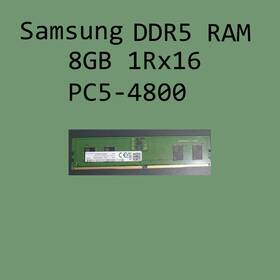
( Brand: Samsung ), ( Manufacturer Part Number: M323R1GB4BB0 ), ( Form Factor: Udimm ), ( Type: Gddr5 Sdram ), ( Total Capacity: 8 Gb ), ( Unit Type: Unit ), ( Number Of Pins: 288 ), ( Bus Speed: Pc5-38400 ), ( Country Of Origin: South Korea )
Review SAMSUNG 8gb Udimm Non ecc Desktop Memory Ram
The **Samsung M323R1GB4BB0** is a high-performance **8GB DDR5 UDIMM Non-ECC** memory module designed to deliver exceptional speed, reliability, and efficiency for modern desktop systems. Engineered with Samsung s cutting-edge **4800MHz (PC5-38400)** clock speed, this RAM module maximizes data transfer rates, ensuring seamless multitasking, faster load times, and smoother performance in demanding applications such as gaming, content creation, and professional workloads. Built on **DDR5 technology**, it supports advanced features like **double the bandwidth** of DDR4, enabling faster memory channels and improved latency reduction, which translates to quicker response times in real-time applications.
As a **UDIMM (Unbuffered Dual In-Line Memory Module)**, this module is optimized for compatibility with a wide range of desktop motherboards, particularly those featuring **AM5, AM4, or LGA 1700 sockets**, making it a versatile upgrade option for both enthusiasts and professionals. The **8GB capacity** strikes a balance between affordability and performance, offering ample space for running multiple applications, large datasets, or high-resolution media without sacrificing speed. With **Non-ECC (Error-Correcting Code) memory**, it is ideal for general use, including gaming, everyday computing, and light content creation, where error correction is unnecessary and where the lower cost of Non-ECC RAM provides better value.
Constructed with **high-quality Samsung chips**, this RAM module ensures stability and longevity, even under heavy workloads. The **DDR5-4800** speed is backed by robust memory controllers that minimize latency and optimize data throughput, making it a perfect fit for systems running on **Intel Core i9, AMD Ryzen 7000, or newer high-end CPUs**. Whether you're upgrading an existing build or assembling a new high-performance PC, this module integrates seamlessly with compatible motherboards, providing a noticeable boost in system responsiveness. Its sleek, low-profile design ensures easy installation, while its reliability guarantees consistent performance over extended periods of use. For users seeking a balance between speed, capacity, and cost-effectiveness, the **Samsung M323R1GB4BB0** stands out as a premium yet practical choice for elevating desktop performance.
The **Samsung M323R1GB4BB0** is an 8GB DDR5-4800 UDIMM (Unbuffered, Non-ECC) memory kit designed for desktop PCs. Below is a detailed breakdown of its pros and cons, followed by a conclusion and recommendation.
---
### **Pros:**1. **High Performance for DDR5 Systems**
The module supports DDR5-4800 (PC5-38400), which is a significant speed upgrade over DDR4. DDR5 offers lower latency (CL32-36-36-76) and higher bandwidth, improving overall system responsiveness, especially in CPU-bound tasks like gaming, content creation, and multitasking. Modern Intel 12th/13th/14th-gen and AMD Ryzen 7000/8000 CPUs are optimized for DDR5, making this RAM a good choice for future-proofing.
2. **Compatibility with Newer Platforms**
This is a **UDIMM (Unbuffered, Non-ECC)** module, meaning it is designed for consumer desktop systems rather than servers or workstations. It is compatible with most **Intel Z790, B760, H770, and H710** motherboards (check your motherboard s QVL for exact compatibility) and **AMD AM5** platforms (though AM5 typically requires DDR5-4800 or higher for optimal performance). It is not compatible with older DDR4-based motherboards.
3. **Reliability and Brand Reputation**
Samsung is a well-established manufacturer with a strong reputation for memory quality. Their DDR5 modules are generally reliable, though like all RAM, they are not immune to defects (e.g., faulty sticks, timing issues).
4. **Single-Rank, Single-Channel (SRSC) Configuration**
This is a single-rank module, which means it has a single memory die. While this limits the potential for higher bandwidth in multi-rank configurations, it also reduces power consumption and heat generation compared to multi-rank modules. For most desktop users, this is sufficient.
5. **Affordable for DDR5**
DDR5 RAM is still relatively expensive compared to DDR4, but this 8GB kit is priced competitively for a Samsung module. It offers a good balance between cost and performance for entry-to-mid-range builds.
6. **Low Power Consumption**
DDR5 modules are designed to be more power-efficient than DDR4, especially at higher speeds. This can contribute to lower system power draw and reduced heat generation.
7. **Future-Proofing**
DDR5 is the current standard, and this module is future-proof for at least the next few years. If you re building a new system, DDR5 is the way to go, and this kit is a solid choice for a budget-friendly option.
---
### **Cons:**1. **Limited Capacity for High-End Use Cases**
This is an **8GB module**, which means you ll need at least two sticks (16GB total) for a dual-channel setup. For most gaming and productivity tasks, 16GB is sufficient, but if you re running memory-intensive applications (e.g., 3D rendering, video editing, or virtualization), you may eventually need to upgrade to 32GB or 64GB. Buying two 8GB sticks now may limit your future upgrade options if you later need more RAM.
2. **No ECC Support**
This is a **Non-ECC** module, meaning it lacks error-correcting code functionality. ECC RAM is crucial for data integrity in servers, workstations, and systems running memory-intensive tasks (e.g., databases, scientific computing). For most consumers, ECC is unnecessary, but if you re using this RAM in a professional or high-reliability setting, you ll need to purchase ECC-compatible modules separately.
3. **UDIMM (Unbuffered) Limitations**
UDIMM modules are designed for consumer desktops and do not have the buffering or error correction of registered (RDIMM) or buffered (LRDIMM) modules. While this is fine for gaming and general use, it means the module cannot be used in enterprise or server-grade systems.
4. **Potential for Latency Bottlenecks**
While DDR5-4800 is fast, some high-end CPUs (especially Intel s latest chips) may benefit from higher-speed RAM (e.g., DDR5-5600 or DDR5-6000) for maximum performance. If you re building a high-end system, you may need to invest in faster RAM later, which could mean replacing these modules.
5. **Compatibility Issues with Some Motherboards**
Not all motherboards support DDR5-4800, and some may require manual timing adjustments or may not recognize the full speed. Always check your motherboard s **Qualified Vendor List (QVL)** or consult the manufacturer s documentation to ensure compatibility. Some budget motherboards may not support high-speed DDR5 modules without BIOS updates.
6. **Single-Stick Limitations**
This is a single-stick module, so if you buy one, you ll need to pair it with another stick of the same model for dual-channel operation. Mixing different brands or speeds can lead to performance degradation or instability. If you only need 8GB, a single stick may work, but dual-channel is generally recommended for better performance.
7. **No XMP/DOCP Support (Unlikely, but Possible)**
While most Samsung DDR5 modules support **XMP (Extreme Memory Profile)** or **AMD s DOCP (Documented Overclocking Profile)**, some budget or older models may not. Always check the product specifications or manufacturer s website to confirm if XMP/DOCP is enabled. If not, you may need to manually set the timing in the BIOS, which could lead to instability if not configured correctly.
8. **Potential for Overheating in High-Ambient Temperatures**
DDR5 modules generate more heat than DDR4, especially at higher speeds. While this module is designed to handle typical desktop cooling, in extreme environments (e.g., overclocked systems in poorly ventilated cases), heat could become an issue. Ensure your system has adequate cooling.
---
### **Conclusion:**The **Samsung M323R1GB4BB0 8GB DDR5-4800 UDIMM Non-ECC** is a solid choice for users building or upgrading a **DDR5-compatible desktop system**, particularly those on a budget. It offers a good balance of performance, reliability, and affordability for DDR5 RAM. The module is well-suited for:
- **Gaming PCs** (especially on Intel 12th/13th/14th-gen or AMD Ryzen 7000/8000 platforms).
- **Productivity tasks** (video editing, photo processing, light multitasking).
- **Entry-to-mid-range builds** where 16GB of RAM is sufficient.
However, it has limitations for users who need:- **More than 16GB of RAM** (you ll need to buy two sticks now or plan to upgrade later).
- **ECC or server-grade reliability** (this is a consumer-grade module).
- **Extreme overclocking or future-proofing for very high-end tasks** (faster DDR5 modules may be better).
If you re building a new system and need **8GB of DDR5 RAM for a single slot** (e.g., for a small form factor or minimalist build), this is a fine choice. For most users, however, pairing it with another identical stick for **16GB dual-channel** will provide better performance.
---
### **Recommendation:** - **Buy this RAM if:**- You re building a **DDR5-compatible desktop** (Intel Z790/B760/H770/H710 or AMD AM5).
- You need **8GB for a single slot** or plan to pair it with another identical stick for **16GB dual-channel**.
- You re on a budget and want **reliable, high-performance DDR5 RAM** from a trusted brand.
- Your use case is **gaming, general productivity, or light content creation**.
- **Consider alternatives if:**- You need **more than 16GB of RAM** (look for 16GB or 32GB kits).
- You require **ECC support** (e.g., for servers, workstations, or data-intensive tasks).
- You want **higher speeds** (e.g., DDR5-5600 or DDR5-6000) for maximum performance.
- You re unsure about compatibility **always check your motherboard s QVL** before purchasing.
- **Pairing Suggestion:**If you re buying two sticks, ensure they are **identical** (same model, speed, and timing) for optimal dual-channel performance. For example, two **Samsung M323R1GB4BB0** sticks will work well together.
- **Future Upgrade Path:**If you plan to add more RAM later, consider buying **two sticks now** (for 16GB) rather than one, as this will allow for easier upgrades to 32GB or 64GB in the future.
Overall, this is a **good, practical choice** for most DDR5 desktop builds, provided you account for its limitations and ensure compatibility with your motherboard.
Details:
Samsung 8GB DDR5-4800 M323R1GB4BB0 PC5-38400 UDIMM Non-ECC Desktop Memory RAM.
part #: m323r1gb4bb0 prices
- $102.89-$480.58
specifications servermemor:
- brand: Samsung
- mpn: M323r1gb4bb0
- form factor: Udimm
- type: Gddr5 Sdram
- total capacity: 8 Gb
- unit type: Unit
- number of pins: 288
- bus speed: Pc5-38400
- country of origin: South Korea
shipping servermemor:
- type: Fixed
- transit: 5-12 Days
- service: Standard
- class: Standard
- cost: $0.00
returns servermemor:
- policy: No Returns
offer servermemor:
- sold: 0
- quantity: 1
- availability: In Stock
- started: February 7, 2026
- options: Ship-to-home
general servermemor:
- condition: Used
- Enterprise Networking, Servers > Server Components > Server Memory RAM
seller servermemor:
- city: Arcadia, Florida
- # reviews: 513
- rating: 98.5%
payments servermemor:
- other
- wallet: Apple-pay
- credit card: Diners-club
Samsung M323R1GB4BB0 Is Similar To:
- 0.09744922496769814 Samsung Ecc Reg Ram (27.6% similar) No other accessories hardware software. I'll get back to you as soon I can...(November 17th, 2018)
- 0.11338225633667265 Lot Samsung Ecc Server Ram Memory (29.2% similar) Condition: used, working if a power adapter is required for this item, it not included cord shows signs of normal use w some scuffs scratches blemishes sticker residue no other accessories hardware software. I'll get back to you as soon I can...(March 27th, 2018)
- 0.1258726855836516 Lot Samsung Server Vlp Ram Ibm (22.2% similar) I'll get back to you as soon I can. Condition: used, working, pictured one but total 36 same if a power adapter is required for this item, it not included cord shows signs of normal use w some scuffs scratches blemishes sticker residue no other accessories hardware software...(October 19th, 2018)
- 0.35100209741590715 Hp Samsung Ecc Reg (20.9% similar) I'll get back to you as soon I can. No other accessories hardware software...(October 12th, 2018)
- 0.3518165772947017 Samsung Cn Ram Ecc Reg Qty (21.3% similar) No other accessories hardware software. I'll get back to you as soon I can...(May 7th, 2018)
- 0.4190561585571104 Lot Samsung Ecc Server Ram (27.9% similar) Condition: used, working if a power adapter is required for this item, it not included cord shows signs of normal use w some scuffs scratches blemishes sticker residue no other accessories hardware software. I'll get back to you as soon I can...(October 13th, 2018)
- 0.4196896457027133 Samsung Ecc Reg Ram (27.8% similar) No other accessories hardware software. I'll get back to you as soon I can...(November 9th, 2018)
- 0.42639317034624824 Samsung Server Vlp Ram Ibm (22.8% similar) I'll get back to you as soon I can. Condition: used, working if a power adapter is required for this item, it not included cord shows signs of normal use w some scuffs scratches blemishes sticker residue no other accessories hardware software...(October 19th, 2018)
- 0.7823584412062607 Samsung Reg Ecc Ram Cn Qty (24.6% similar) I'll get back to you as soon I can. No other accessories hardware software...(June 19th, 2018)
- 0.850481806304197 Lot Samsung Hynix Server Ecc Ram (25.2% similar) Condition: used, working if a power adapter is required for this item, it not included cord shows signs of normal use w some scuffs scratches blemishes sticker residue no other accessories hardware software. I'll get back to you as soon I can...(October 16th, 2018)
- 0.9516050138760368 Samsung Registered Ecc Memory (28.8% similar) Condition: used, working if a power adapter is required for this item, it not included cord shows signs of normal use w some scuffs scratches blemishes sticker residue no other accessories hardware software. I'll get back to you as soon I can...(May 26th, 2018)