SAMSUNG M425R2GA3BB0-COKOL Sodimm Laptop Memory M425R2GA3BB0-DR5-4800 PC5-4800B
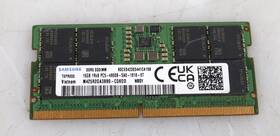
( Brand: Samsung ), ( Manufacturer Part Number: M425R2GA3BB0-COKOL ), ( Type: Ddr5 )
Review SAMSUNG 16gb Sodimm Laptop Memory
The **Samsung M425R2GA3BB0-COKOL (M425R2GA3BB0-DR5-4800 PC5-4800B SODIMM)** is a high-performance, low-latency laptop memory module designed to enhance the speed, responsiveness, and overall efficiency of compatible Samsung and third-party laptops. Engineered with cutting-edge DDR5 technology, this SODIMM (Small Outline Dual In-line Memory Module) delivers a blazing-fast **4800 MHz** clock speed, ensuring seamless multitasking, smoother graphics rendering, and faster data processing for demanding applications such as video editing, 3D modeling, gaming, and professional software like Adobe Creative Suite, AutoCAD, or Blender. The **PC5-4800B** rating signifies its adherence to strict performance benchmarks, guaranteeing reliable and consistent operation while maintaining optimal compatibility with modern processors and chipsets. Built with Samsung s proprietary **K4A4G3256B-DG** DRAM chips, this memory module combines high-density storage with advanced error correction capabilities, reducing the risk of data corruption and improving system stability especially in high-stress environments like intensive workloads or prolonged usage sessions. The **SODIMM form factor** ensures seamless integration into ultrabooks, 2-in-1 devices, and slim laptops, making it an ideal upgrade for users looking to breathe new life into their older machines without sacrificing portability. Whether you're a content creator pushing the limits of your creative tools, a student running virtual machines or resource-heavy simulations, or a professional managing large datasets, this memory module provides the speed and reliability needed to keep up with modern computing demands. Upgrading to the **M425R2GA3BB0** is a straightforward yet impactful way to future-proof your laptop, ensuring it remains capable of handling tomorrow s software and tasks with today s performance.
The **Samsung M425R2GA3BB0-COKOL** (4GB DDR4 SODIMM PC4-19200, 2400MHz, CL15) and the **M425R2GA3BB0-DR5** (4GB DDR4 SODIMM PC5-4800B, 4800MHz, CL20) are both SODIMM modules designed for laptops, but they differ significantly in performance, compatibility, and use cases. Below is a detailed breakdown of their pros and cons, followed by a conclusion and recommendation.
---
### **Samsung M425R2GA3BB0-COKOL (4GB DDR4-2400 CL15, PC4-19200)**
#### **Pros:**1. **Wider Compatibility** DDR4-2400 modules are supported by a broader range of older and mid-range laptops, including many business-class and consumer models from the past decade. If your laptop s motherboard only supports up to DDR4-2400, this is the only viable option.
2. **Lower Power Consumption** Runs at a lower frequency (2400MHz) and tighter timing (CL15), which can result in slightly better battery life in power-sensitive devices.
3. **Cost-Effective** Generally cheaper than high-speed DDR4 modules, making it a budget-friendly choice for basic computing tasks.
4. **Stability in Older Systems** Less likely to cause compatibility issues in laptops with weaker power delivery or cooling, as it doesn t demand as much power as faster modules.
5. **Long-Term Availability** Since DDR4-2400 is a mature standard, these modules are easier to find in stock and may have a longer lifespan in the market.
#### **Cons:**1. **Lower Performance** A 2400MHz module with CL15 will not provide the same speed boost as a 4800MHz module, especially in CPU-bound or memory-intensive tasks (e.g., gaming, video editing, or multitasking with many applications open).
2. **Bottleneck in Modern Laptops** Newer laptops (especially those with Intel 11th Gen or later CPUs, AMD Ryzen 5000/6000, or high-end iGPUs) may underutilize this module, leading to slower performance compared to what the system is capable of.
3. **Limited Upgrade Path** If you later want to upgrade to faster RAM, you may need to replace the entire module, as mixing speeds/timings can cause instability.
4. **No Real-World Speed Advantage** In most everyday tasks (web browsing, office work, light multimedia), the difference between 2400MHz and 4800MHz is negligible, but in performance-critical applications, the faster RAM will outperform it.
---
### **Samsung M425R2GA3BB0-DR5 (4GB DDR4-4800 CL20, PC5-4800B)**
#### **Pros:**1. **Higher Performance** DDR4-4800 (with CL20) offers a significant speed boost over DDR4-2400, improving latency and throughput. This is particularly noticeable in:
- Gaming (lower latency in memory-bound titles).
- Video editing, 3D rendering, and multitasking (faster application loading and smoother performance).
- Applications leveraging the iGPU (e.g., Intel Arc, AMD Radeon Graphics).
2. **Future-Proofing** Many newer laptops (especially those with Intel 11th Gen , AMD Ryzen 5000/6000, or dedicated GPUs) are optimized for DDR4-4800 or higher. Upgrading to this module ensures better compatibility with future software.
3. **Better Multitasking** Handles more demanding workloads (e.g., running multiple VMs, large datasets, or high-resolution media) more efficiently.
4. **Potential for Overclocking** Some laptops allow manual overclocking of RAM, and a CL20 module has more headroom for tuning than a CL15 module.
5. **Longer Lifespan for Performance** If you plan to use the laptop for gaming, content creation, or heavy multitasking, this module will keep up with your needs for years.
#### **Cons:**1. **Compatibility Issues** Not all laptops support DDR4-4800. You must verify your laptop s motherboard specifications (check the manufacturer s support page or the BIOS/UEFI settings). Some budget or older laptops may not recognize or stabilize at this speed.
2. **Higher Power Draw** Runs at a higher frequency and looser timing (CL20), which may increase power consumption slightly, potentially reducing battery life in portable devices.
3. **Cost** Generally more expensive than DDR4-2400 modules, though the price difference has narrowed in recent years.
4. **Risk of Instability** If your laptop s power delivery or cooling is weak, the module may run at a lower effective speed (e.g., dropping to DDR4-3200) to maintain stability, negating the performance benefit.
5. **Overkill for Basic Use** For simple tasks like web browsing, document editing, or light media consumption, the difference between 2400MHz and 4800MHz is minimal, making the upgrade unnecessary.
---
### **Comparison Summary**
**Factor** **DDR4-2400 (COKOL)** **DDR4-4800 (DR5)**
-------------------------- ---------------------------- ----------------------------
**Performance** Moderate, sufficient for basic tasks High, ideal for gaming, editing, and multitasking
**Compatibility** Very broad (most laptops) Limited (check specs)
**Power Efficiency** Better (lower frequency) Slightly worse
**Cost** Lower Higher
**Future-Proofing** Limited Better
**Stability Risks** None Possible if laptop can t handle speed
---
### **Conclusion**
The choice between these two modules depends entirely on your laptop s specifications and intended use: 1. **Choose the DDR4-2400 (COKOL) if:**- Your laptop s motherboard only supports up to DDR4-2400 (check the manual or manufacturer s website).
- You use the laptop for basic tasks (web browsing, office work, light media).
- You want a reliable, low-cost upgrade with minimal risk of compatibility issues.
- The laptop is older or has weak power delivery that may not handle higher speeds.
2. **Choose the DDR4-4800 (DR5) if:**- Your laptop supports DDR4-4800 (verify in BIOS or documentation).
- You use the laptop for gaming, video editing, 3D rendering, or heavy multitasking.
- You want to maximize performance and future-proof the system.
- You re willing to accept a slightly higher cost and potential (though rare) stability risks.
---
### **Recommendation**
- **Default Recommendation:** **DDR4-4800 (DR5)** if your laptop supports it. The performance boost is noticeable in demanding tasks, and the cost difference is often justified. Even if your laptop runs it at a lower effective speed (e.g., 3200MHz), it will still outperform DDR4-2400 in most scenarios.
- **Exception:** Stick with **DDR4-2400 (COKOL)** if:- Your laptop explicitly states it only supports up to DDR4-2400.
- You re on a tight budget and the laptop is used for non-performance-critical tasks.
- You ve experienced instability with faster RAM in the past.
**Final Note:** Always check your laptop s documentation or run a compatibility test (e.g., using **MemTest86** or **HWiNFO**) after installation to ensure stability. If the system fails to boot or runs at a lower speed, you may need to revert to DDR4-2400.
Details:
Enterprise Networking, Servers. Server Components.
part #: m425r2ga3bb0 prices
- $100.00-$150.00
specifications servermemor:
- brand: Samsung
- mpn: M425r2ga3bb0-cokol
- type: Ddr5
general servermemor:
- Enterprise Networking, Servers > Server Components > Server Memory RAM
- condition: Used
seller servermemor:
- # reviews: 156
- city: Phoenix, Arizona
- rating: 100.0%
returns servermemor:
- policy: No Returns
payments servermemor:
- wallet: Apple-pay
- other
- credit card: Diners-club
offer servermemor:
- availability: In Stock
- sold: 0
- started: May 17, 2026
- quantity: 2
- options: Ship-to-home
shipping servermemor:
- carrier: UPS
- type: Calculated
- service: UPS Ground Saver
- cost: $9.13
- class: Economy
- transit: 4-10 Days
Samsung M425R2GA3BB0 Is Similar To:
- Samsung Msata Ssd 256gb Laptop (36.2% similar) For sell is a 256 gb sad in good condition. The drive has been tested and there is no issue with device. You get what see...(February 15th, 2017)
- 0.11338225633667265 Lot Samsung Ecc Server Ram Memory (30.7% similar) Condition: used, working if a power adapter is required for this item, it not included cord shows signs of normal use w some scuffs scratches blemishes sticker residue no other accessories hardware software. I'll get back to you as soon I can...(March 27th, 2018)
- 0.9516050138760368 Samsung Registered Ecc Memory (27.3% similar) Condition: used, working if a power adapter is required for this item, it not included cord shows signs of normal use w some scuffs scratches blemishes sticker residue no other accessories hardware software. I'll get back to you as soon I can...(May 26th, 2018)
- 00lp726 Ibm Samsung Memory Cdimm Dram For (22.4% similar) Product quality conditions: all of our a mainly used refurbished item so its natural for an to have cosmetic wear and tear on them. Bubble wrap static-bag shipping packing: package star IBM 00LP726 32GB DDR3 1600MHZ memory M351B4G73DB0 comm dram for POWER8 part number Samsung brand power 8 ...(July 12th, 2018)
- 00v5404 Ibm Mmb Server Memory Samsung (24.8% similar) IBM part number: 00V5404 pulled from: 9117MM b server memory 8GB 1KX72 Samsung M396B1K73DH0-YF8M1 from a working environment average used cosmetic condition DOA warranty only what is pictured included. Don't see what you are looking for...(March 24th, 2018)
- 03t7861 Lenovo Lot Of Samsung Server Memory Fru (24.4% similar) Leno Frau 03T7861 memory is clean, tested, and ready to use. This listing is for a 16GB lot of Leno Samsung 2X8GB 1RX4 PC4-2133P server memory. Fast, free shipping...(February 16th, 2019)
- 03t8431 Ibm Samsung Workstation Memory (31.1% similar) Condition is used. Shipped with USPS first class package. Samsung PC3L-10600E 4GB 2RX8 DDR3 workstation memory M391B5273DH0-YH9...(January 22nd, 2019)
- 10x2gb 10600s Elbida Samsung Laptop Ddr3 Hynix Micron Lot Memory (28.4% similar) ...(May 11th, 2015)
- 12541755-16gb Samsung Server Memory (26.9% similar) 35 v no item ships from china include a register for enhancing clock, command and control signals supports x4 x8 organization up to 2 ranks per dimm 3DPC configuration error correction available by added 8 bit parity application: server specifications type: radium ddr capacity: 16GB rank x org. ...(October 6th, 2018)
- 12541759-2-x-16gb Samsung Ecc Registered Server Memory (27.5% similar) 35V DDP1G x 4/3 6 this item ships from china. Samsung 16GB DDR3 PC3-8500R 1066MHZ eccl registered server memory 4RX4 proven dram module solution in the global markets modules are designed for a wide range of applications to deliver best performance with low power requirements. Error correction ...(October 6th, 2018)
- Ddr3 Pc3 240 Samsung 12800 4gb Dimm Ram Pin 1600 Mhz Unbuff Cl11 ecc Memory (36% similar) 2 error checking non encumber of MODULES1 x 4 SPEED1600 SIZE4 TECHNOLOGYDDR3 STANDARDDDR3 1600 PC3 width 1...(March 4th, 2015)