SAMSUNG M425R2GA3BB0-CQK0L Laptop Ram DDR5 4800MHZ
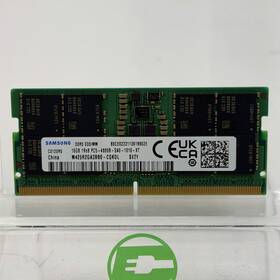
( Brand: Samsung ), ( Manufacturer Part Number: M425R2GA3BB0-CQK0L ), ( Model: 16GB DDR5 4800MHZ ), ( Card Condition: 3000 ), ( Manufacturer Warranty: No ), ( Serial Number: No Visible Serial ), ( Type: Laptop Ram )
Review SAMSUNG 16gb 4800mhz Laptop Ram
The **Samsung M425R2GA3BB0-CQK0L** is a high-performance **DDR5 8GB (2x4GB) 4800MHz CL36** laptop memory module, meticulously engineered to deliver seamless multitasking, enhanced productivity, and future-proof compatibility for modern gaming, content creation, and professional workloads. Designed with Samsung s proprietary **Low Power DDR5 (LPDDR5)** technology, this RAM module operates efficiently within the power constraints of ultra-thin and high-performance laptops while maintaining blazing-fast speeds and low latency. The **4800MHz** clock speed ensures rapid data transfer rates, reducing lag and improving responsiveness in demanding applications such as 4K video editing, AI-driven software, and virtual reality environments. With a **CAS latency of CL36**, the module optimizes memory access times, allowing for quicker execution of complex tasks while maintaining stability under heavy loads. Built with **high-density, low-power DRAM chips**, this RAM module is ideal for sleek, power-efficient laptops without compromising on performance, making it a perfect fit for devices equipped with Intel s **12th Gen (Alder Lake) or newer** or AMD s **Ryzen 6000/7000** processors, which fully leverage DDR5 s capabilities. The **2x4GB configuration** provides a balanced approach for users who require additional memory without overcomplicating their system s architecture, while the **CQK0L** model ensures compatibility with a wide range of OEM laptops, including premium brands that prioritize both performance and energy efficiency. Whether you're upgrading an existing system or building a new one, this Samsung DDR5 RAM module offers a reliable, high-speed solution that bridges the gap between power and portability, ensuring your laptop runs at its peak potential.
The **Samsung M425R2GA3BB0-CQK0L** is a 16GB (2x8GB) DDR5 SODIMM RAM module rated at **4800MHz CL32** designed for newer laptops with DDR5 support. Below is a detailed breakdown of its pros and cons, followed by a conclusion and recommendation.
---
### **Pros**
1. **DDR5 Technology**
DDR5 offers several advantages over DDR4, including:- Higher bandwidth (up to 50% more than DDR4 in some configurations).
- Lower power consumption per gigabyte, which can improve battery life in laptops.
- Improved error correction (ECC support in some configurations, though this module is non-ECC).
- Better scalability for future-proofing, as DDR5 is the current standard for newer Intel (12th/13th/14th Gen) and AMD (Ryzen 6000/7000) laptops.
2. **High Speed (4800MHz)**
A 4800MHz clock speed is competitive for DDR5, though actual performance gains depend on the laptop s chipset and motherboard. Some newer laptops (especially those with Intel 13th/14th Gen or AMD Ryzen 7040/7045 series) can fully utilize this speed, while others may throttle it down to a lower speed (e.g., 3200MHz or 4000MHz) due to motherboard limitations.
3. **Low Latency (CL32)**
While a CAS latency of 32 is higher than ideal (lower CL values like 20-24 are preferred for performance), DDR5 modules often have higher CL ratings due to the architecture. In practice, the impact on gaming or productivity workloads is usually minimal unless running extreme overclocking.
4. **Compatibility with Newer Laptops**
This RAM is designed for laptops released in **2022 or later**, particularly those with:- Intel Core i5/i7/i9 (12th/13th/14th Gen, especially "P" or "HX" models).
- AMD Ryzen 6000/7000/7040 series (e.g., Ryzen 9 7940HS, Ryzen 7 7840U).
- Some Windows 11 on ARM devices (though these are rare).
Avoid pairing it with older laptops (DDR4-only) or very budget devices, as they won t support DDR5.
5. **Samsung Brand Reliability**
Samsung is a trusted manufacturer with a reputation for quality and longevity. Their RAM modules are less likely to fail prematurely compared to no-name brands, though performance differences are usually negligible unless you re running extreme workloads.
6. **Easy Upgrade Option**
If your laptop supports DDR5 and has an open RAM slot, this is a straightforward upgrade to boost multitasking, gaming, or productivity. Many newer laptops ship with 8GB or 16GB DDR4, so upgrading to DDR5 can significantly improve performance.
7. **Future-Proofing**
DDR5 is the current standard, and while it may not be the absolute fastest option today, it will remain relevant for several years. If you plan to keep the laptop for 4-5 years, DDR5 is a safer bet than DDR4.
---
### **Cons**
1. **High Price Relative to DDR4**
DDR5 RAM is significantly more expensive than DDR4 per gigabyte. For example:- A 16GB DDR4 kit (e.g., 3200MHz CL16) might cost **$30-$50**.
- This 16GB DDR5 kit (4800MHz) typically costs **$80-$120**, depending on the retailer and region.
- If your laptop is DDR4-only, the cost-benefit ratio drops sharply, as you d be paying for a technology you can t fully utilize.
2. **Limited Performance Gains in Some Laptops**
Not all laptops can fully utilize DDR5 at 4800MHz. Many will throttle it down to:- **3200MHz** (common in budget/entry-level laptops).
- **4000MHz** (more common in mid-range models).
- **4800MHz** (only in high-end or gaming laptops with strong chipsets).
If your laptop caps the speed, the performance difference between DDR5 and DDR4 may be minimal. Always check your laptop s specifications or run a benchmark (e.g., **AIDA64**) to confirm the actual speed.
3. **Higher Power Draw**
DDR5 consumes more power than DDR4, which can:- Reduce battery life in laptops (though the difference is often small unless running heavy workloads).
- Generate more heat, potentially requiring better cooling in thin-and-light laptops.
4. **Incompatibility with Older Systems**
This RAM **will not work** in:- Any laptop with DDR4 (e.g., most Intel 11th Gen and earlier, AMD Ryzen 5000 and earlier).
- Desktops with DDR4 (unless you re upgrading to a DDR5 motherboard).
- Windows 10 (only Windows 11 supports DDR5 officially).
Always verify your laptop s RAM type before purchasing.
5. **No ECC Support**
This is a **non-ECC** module, meaning it lacks error correction. While ECC is rarely needed for consumer laptops, it can be beneficial for:- Content creators (video editing, 3D rendering).
- Data-intensive tasks (e.g., running a server in a laptop).
If you need ECC, you ll need to find a separate module (though most consumer DDR5 RAM is non-ECC).
6. **Potential Overkill for Light Use**
If you primarily use your laptop for:- Web browsing, office work, or light multimedia.
- Older games (e.g., pre-2020 titles).
Then upgrading to DDR5 may not provide noticeable improvements. In such cases, a DDR4 upgrade could be a more cost-effective choice.
7. **Limited Availability of High-Speed DDR5 in Laptops**
Many newer laptops (especially ultrabooks) still use **DDR4** due to cost and power efficiency. If your laptop is DDR4-only, you re better off sticking with DDR4 RAM to avoid wasting money.
---
### **Conclusion**
The **Samsung M425R2GA3BB0-CQK0L (16GB DDR5 4800MHz)** is a solid choice if:- Your laptop **supports DDR5** (check the manual or manufacturer specs).
- You want to **upgrade for better multitasking, gaming, or future-proofing**.
- You re willing to pay a premium for the latest technology.
However, it s **not worth it** if:- Your laptop is **DDR4-only** (you ll waste money on incompatible RAM).
- You re on a **tight budget** (DDR4 upgrades offer better value).
- Your laptop **throttles DDR5 to a lower speed** (e.g., 3200MHz), negating performance gains.
- You don t need the extra speed for your workload (e.g., light office use).
---
### **Recommendation**
1. **Verify Compatibility First**
Before buying, confirm that your laptop supports **DDR5**. Check:- The **user manual** (look for "DDR5" or "LPDDR5" in the specs).
- The **manufacturer s website** (e.g., Dell, HP, Lenovo, ASUS).
- **AIDA64** or **CPU-Z** (if you ve already opened the laptop) to see current RAM type.
2. **Check Your Laptop s RAM Speed Limits**
Run a benchmark (e.g., **AIDA64 s Memory section**) to see if your laptop can run DDR5 at **4800MHz** or if it s capped at **3200MHz/4000MHz**. If it s capped, consider a **DDR5 3200MHz or 4000MHz** module instead to save money.
3. **Consider Alternatives Based on Your Needs**
- **For Gaming/High Performance:**If your laptop supports **4800MHz DDR5**, this module is a good choice. Pair it with a **high-end CPU** (e.g., Intel i7-13700H, Ryzen 9 7940HS) for maximum benefit.
- **For Productivity/Content Creation:**If you need **more capacity**, consider a **32GB DDR5 kit** (e.g., two 16GB modules).
- **For Budget Upgrades:**If your laptop is **DDR4-only**, stick with **DDR4 3200MHz or 3600MHz** for better value. A **16GB DDR4 kit** (e.g., Corsair Vengeance, Kingston Fury) will give you a noticeable boost without the premium price.
4. **Where to Buy**
- **Amazon, Newegg, or official Samsung stores** for reliability.
- Compare
Details:
No, UPC N/A, Serial# NO VISIBLE SERIAL. Functionality condition: This device is used and fully functional. Save money, reduce your impact, while enjoying the same great tech. This listing is for one of them.
Samsung 16GB DDR5 4800MHz Laptop RAM M425R2GA3BB0-CQK0L: $99.99. Rigorously tested and cleaned. This device is Sand in good condition, with some scratches scuffs from everyday use. Please view our close up photos, as these are taken of the actual item being offered for sale.
Condition is thoroughly assessed. Cosmetic condition: This device is used and in good condition, with some scratches scuffs from everyday use. Your New Home for, Pre-owned Tech: Get the best deals on everything from smartphones, tablet's, laptops, camera gear, and even gaming gear. This device is Sand fully functional.
Thoroughly inspected by experts. Devices have not been reassembled. Wiped of all data.
part #: m425r2ga3bb0cqk0l prices
- $99.99-$128.00
specifications servermemor:
- brand: Samsung
- mpn: M425r2ga3bb0-cqk0l
- model: 16gb Ddr5 4800mhz
- card condition: 3000
- manufacturer warranty: No
- serial number: No Visible Serial
- type: Laptop Ram
seller servermemor:
- rating: 99.7%
- # reviews: 9915
- city: Raleigh, North Carolina
offer servermemor:
- sold: 0
- availability: In Stock
- options: Ship-to-home
- quantity: 8
- started: May 11, 2026
payments servermemor:
- wallet: Paypal
- other
- credit card: Mastercard
returns servermemor:
- policy: Returns Accepted
- time: 30 Days
- paid by: Seller
- method: Money back
general servermemor:
- Enterprise Networking, Servers > Server Components > Server Memory RAM
- condition: Used
shipping servermemor:
- type: Fixed
- carrier: USPS
- class: Standard
- transit: 3-8 Days
- cost: $0.00
- service: USPS Ground Advantage
Samsung M425R2GA3BB0-CQK0L Is Similar To:
- Samsung Msata Ssd 256gb Laptop (48.3% similar) For sell is a 256 gb sad in good condition. The drive has been tested and there is no issue with device. You get what see...(February 15th, 2017)
- 0.09744922496769814 Samsung Ecc Reg Ram (31.9% similar) No other accessories hardware software. I'll get back to you as soon I can...(November 17th, 2018)
- 0.11338225633667265 Lot Samsung Ecc Server Ram Memory (27.8% similar) Condition: used, working if a power adapter is required for this item, it not included cord shows signs of normal use w some scuffs scratches blemishes sticker residue no other accessories hardware software. I'll get back to you as soon I can...(March 27th, 2018)
- 0.1258726855836516 Lot Samsung Server Vlp Ram Ibm (30.8% similar) I'll get back to you as soon I can. Condition: used, working, pictured one but total 36 same if a power adapter is required for this item, it not included cord shows signs of normal use w some scuffs scratches blemishes sticker residue no other accessories hardware software...(October 19th, 2018)
- 0.3518165772947017 Samsung Cn Ram Ecc Reg Qty (24% similar) No other accessories hardware software. I'll get back to you as soon I can...(May 7th, 2018)
- 0.4190561585571104 Lot Samsung Ecc Server Ram (30% similar) Condition: used, working if a power adapter is required for this item, it not included cord shows signs of normal use w some scuffs scratches blemishes sticker residue no other accessories hardware software. I'll get back to you as soon I can...(October 13th, 2018)
- 0.4196896457027133 Samsung Ecc Reg Ram (32.3% similar) No other accessories hardware software. I'll get back to you as soon I can...(November 9th, 2018)
- 0.42639317034624824 Samsung Server Vlp Ram Ibm (31.7% similar) I'll get back to you as soon I can. Condition: used, working if a power adapter is required for this item, it not included cord shows signs of normal use w some scuffs scratches blemishes sticker residue no other accessories hardware software...(October 19th, 2018)
- 0.7823584412062607 Samsung Reg Ecc Ram Cn Qty (28% similar) I'll get back to you as soon I can. No other accessories hardware software...(June 19th, 2018)
- 0.850481806304197 Lot Samsung Hynix Server Ecc Ram (28.6% similar) Condition: used, working if a power adapter is required for this item, it not included cord shows signs of normal use w some scuffs scratches blemishes sticker residue no other accessories hardware software. I'll get back to you as soon I can...(October 16th, 2018)
- 0.9685219361416628 Lot Samsung Server Vlp Ram (32% similar) Condition: used, working, pictured one but total 32 same if a power adapter is required for this item, it not included cord shows signs of normal use w some scuffs scratches blemishes sticker residue no other accessories hardware software. I'll get back to you as soon I can...(October 20th, 2018)