SAMSUNG M464S1724ETS-TC75 Sdr Dimm 256MB PC133S-333-542-B1 144-PIN
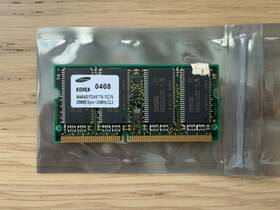
( Brand: Samsung ), ( Manufacturer Part Number: M464S1724ETS-TC75 ), ( Form Factor: So-dimm ), ( Type: Sdr Sdram ), ( Total Capacity: 256 Mb ), ( Number Of Pins: 144 ), ( Bus Speed: Pc-133 ), ( Country Of Origin: United States )
Review SAMSUNG 256mb Sdr 144-pin So Dimm
The **Samsung M464S1724ETS-TC75** is a high-performance, low-latency DDR SDRAM memory module designed to deliver reliable and efficient data transfer for a wide range of computing applications. Part of Samsung s trusted line of memory solutions, this **256MB PC133 (DDR SDRAM)** module operates at a clock speed of **133 MHz**, translating to an effective data transfer rate of **266 MB/s per pin**, while maintaining a robust **PC133 (DDR-200) standard** for compatibility with older and mid-range motherboards. With a **542-cycle CAS latency (CL5)**, this module strikes a balance between speed and stability, making it well-suited for systems requiring smooth multitasking, light gaming, or general-purpose computing without the need for cutting-edge performance. The **144-pin DIMM (Dual Inline Memory Module)** form factor ensures seamless integration into standard desktop motherboards, adhering to the **JEDEC standard** for easy installation and compatibility with a broad spectrum of Intel and AMD-based platforms from the late 1990s and early 2000s.
Built with Samsung s proprietary **TAC (Trench Assisted Capacitor)** technology, this module enhances reliability by reducing leakage current and improving data retention, which is particularly beneficial for systems running for extended periods without power interruptions. The **ETS (Enhanced Timing Specification)** designation indicates that the module has undergone rigorous testing to ensure consistent performance under varying thermal conditions, making it a dependable choice for users seeking a balance between affordability and durability. While not designed for high-end gaming or professional workloads, its **256MB capacity** provides ample memory for everyday tasks such as web browsing, office applications, multimedia playback, and light software development, ensuring a responsive and lag-free experience. The **B1 (Battery Backup) designation** further underscores its stability, as it is optimized to work seamlessly with systems equipped with battery-backed CMOS (Complementary Metal-Oxide-Semiconductor) chips, reducing the risk of memory-related boot failures. Whether used in a legacy system upgrade or as a budget-friendly addition to an older PC, the **Samsung M464S1724ETS-TC75** remains a reliable and efficient memory solution for those seeking a straightforward, no-frills upgrade.
### **Pros and Cons of buying a Samsung M464S1724ETS-TC75 (256MB, PC133, 144-Pin DIMM)**
#### **Pros:**1. **Compatibility with Older Systems** This is a **PC133 SDRAM** module, which means it is designed for older motherboards (typically those from the late 1990s to early 2000s) that support **DDR SDRAM** or **DDR2** (though DDR2 requires a different module). It will work in systems with **Socket 478, Socket A (AMD Athlon XP), or early Intel Pentium 4 motherboards** that have a **144-pin DIMM slot** and support **133MHz SDRAM**.
2. **Low Cost** Being an older, bulk memory module, it is **cheap** compared to modern RAM. This makes it a viable option for **retro computing, repairs, or budget upgrades** for legacy systems.
3. **Sufficient for Basic Tasks** At **256MB**, this module is **enough for light tasks** such as:- Running **Windows XP/2000** (with basic applications).
- Basic **gaming (older titles like Half-Life, Counter-Strike, or early 3D games)**.
- **Office work, web browsing, and simple multimedia** (if paired with a fast CPU and GPU).
4. **Easy to Install** Since it is a **single 256MB stick**, installation is straightforward no need for matching pairs (unlike some dual-channel setups).
5. **Potential for Upgrading Legacy Systems** If you have an **old but functional PC** that struggles with modern OS requirements (e.g., Windows 10/11 on a very old system), adding this RAM can **extend its usability** for a few more years.
---
#### **Cons:**1. **Extremely Slow Compared to Modern Standards**
- **PC133 SDRAM** runs at **133MHz**, which is **far slower** than even **DDR2 (400MHz )** from the mid-2000s.
- Modern systems (even budget ones) use **DDR4/DDR5 at 2400MHz **, making this RAM a **bottleneck** for any modern workload.
- **Benchmark comparison**: A **256MB PC133 module** will perform **worse than a 256MB DDR2 module** from 2005, let alone modern RAM.
2. **Limited Capacity for Modern Needs**
- **256MB is insufficient** for:- Running **Windows 10/11** (minimum **4GB recommended**, 8GB ideal).
- **Modern browsers, video editing, or multitasking**.
- **Any serious gaming or productivity work** beyond the early 2000s.
- If you try to **upgrade the OS**, you ll likely need **additional RAM** (or a full system swap).
3. **Not Future-Proof**
- This RAM **will not work in modern motherboards** (Intel 100/200 series, AMD AM4, etc.), which require **DDR4/DDR5**.
- Even **older but still functional motherboards** (e.g., Intel LGA775, AMD 939/940) may **not support PC133** if they were designed for **DDR2/DDR3**.
4. **Potential Compatibility Issues**
- Some **older motherboards** may **not recognize PC133 modules** if they were designed for **DDR2 (PC3200/PC4200)**.
- **Check your motherboard manual** to confirm **exact RAM support** before purchasing.
- **Timing (B1-5-5-1)** is standard for PC133, but some boards may **not like it** if they expect stricter timings.
5. **No Error Correction (ECC) or Low Power Options**
- This is **non-ECC, non-low-power RAM**, meaning it **does not support error correction** (useful for servers) or **reduced power consumption** (useful for laptops).
- If you need **reliability in a server or embedded system**, this is **not a good choice**.
6. **Difficulty Finding Replacements**
- **PC133 SDRAM is obsolete** finding matching modules for upgrades will be **very difficult**.
- If the module fails, **replacement parts may be hard to source** compared to DDR2/DDR3.
7. **Not Suitable for Modern OS Installations**
- **Windows 10/11** will **not run properly** with just **256MB RAM** it will **constantly crash or fail to install**.
- Even **Windows XP** will struggle with **modern applications** (e.g., Chrome, Office 2010 ).
---
### **Conclusion:** This **Samsung PC133 256MB DIMM** is a **niche product** with **very limited practical use cases** in today s market. It is **best suited for:**- **Restoring or repairing very old PCs** (late 1990s to early 2000s) that **cannot run modern OSes** but can still function with **Windows 98/ME/XP (with heavy limitations)**.
- **Retro computing enthusiasts** who want to **run old games or software** in a **minimalist setup**.
- **Budget upgrades for legacy systems** where **any extra RAM helps**, even if it s slow.
**It is not recommended for:**- **Modern computing** (anything beyond **2005-era hardware**).
- **Running Windows 10/11 or modern applications**.
- **Gaming, video editing, or heavy multitasking**.
- **Systems that require DDR2/DDR3/DDR4/DDR5 RAM**.
If you **must** use this RAM, ensure:Your **motherboard supports PC133 SDRAM** (check the manual).
You **accept severe performance limitations**.
You **pair it with a fast CPU and GPU** to mitigate the RAM bottleneck.
You **do not expect it to run modern software**.
---
### **Recommendation:** - **If you have a working old PC (pre-2005) and need RAM:**- **Buy this module** if you **only need to keep an old system alive** for nostalgia or very basic tasks.
- **Consider upgrading to DDR2 (PC3200/PC4200) if possible** it s still cheap and **much faster** than PC133.
- **If you want to run Windows XP/2000 properly:**- **Minimum:** **512MB DDR2 (PC3200)** for a **basic XP setup**.
- **Ideal:** **1GB DDR2** for **smooth multitasking**.
- **If you want to run modern Windows (10/11):**- **Minimum:** **4GB DDR4 (for Intel/AMD AM4 and newer)**.
- **Budget upgrade for older systems:** **2GB DDR3 (for Intel LGA775/AMD AM2 )**.
- **For retro gaming (DOSBox, old Windows games):**- **256MB PC133 may work**, but **DDR2 is better** if you can find it.
- **Consider a modern PC with virtualization** (VMware, VirtualBox) for better performance.
**Final Verdict:**This RAM is **only useful for very specific, low-end legacy computing needs**. For **anything else, modern or even mid-2000s RAM is a far better investment**. If you re buying it **just to see if it works**, proceed with caution expect **slow performance and limited functionality**.
Details:
Still working as expected. Pull out from my Dell C400 Laptop.
part #: m464s1724etstc75 prices
- $13.98-$19.95
specifications servermemor:
- brand: Samsung
- mpn: M464s1724ets-tc75
- form factor: So-dimm
- type: Sdr Sdram
- total capacity: 256 Mb
- number of pins: 144
- bus speed: Pc-133
- country of origin: United States
seller servermemor:
- city: San Jose, California
- # reviews: 203
- rating: 100.0%
shipping servermemor:
- service: USPS Ground Advantage
- cost: $0.00
- transit: 5-12 Days
- carrier: USPS
- class: Standard
- type: Calculated
offer servermemor:
- sold: 0
- quantity: 1
- options: Ship-to-home
- best offers: True
- started: March 28, 2026
- availability: In Stock
returns servermemor:
- policy: No Returns
payments servermemor:
- other
- wallet: Google-pay
- credit card: Discover
general servermemor:
- condition: Used
- Enterprise Networking, Servers > Server Components > Server Memory RAM
Samsung M464S1724ETS-TC75 Is Similar To:
- Ddr3 Pc3 240 Samsung 12800 4gb Dimm Ram Pin 1600 Mhz Unbuff Cl11 ecc Memory (24.7% similar) 2 error checking non encumber of MODULES1 x 4 SPEED1600 SIZE4 TECHNOLOGYDDR3 STANDARDDDR3 1600 PC3 width 1...(March 4th, 2015)
- 2gb-53 Samsung Fb Dimm Server Memory Kit (25.7% similar) Pulled from a working server. In great shape...(March 25th, 2018)
- 45d8422 Ibm New Samsung Dimm Ram Memory Fully Tested (19.8% similar) The IBM 45D8422 has been inspected by our expert in-house certified technician, and is ready to ship today. Join us in the green movement and enjoy lightning fast solutions at ultimate value. The IBM 45D8422 is 16GB of DDR3 1066MHZ memory. The IBM 45D8422 memory is perfect addition to your device, ...(February 7th, 2019)
- 500205-717 Samsung 500205-171 8gb 240-pin (30.9% similar) Samsung 8GB 240-PIN DDR3 sdram eccl registered PC3 server memory...(February 23rd, 2018)
- 8gn622r08 Samsung Dual Rank Memory Stick Pin (28.3% similar) This order is for 4 PCs of Samsung M378B1G73QH0-CK08GB dual rank memory module 2RX8 pc -128OOU-11S c: 9N139400LRNP...(May 21st, 2018)
- Ddr3-1333mhz 15-12291-01 M393b1k70ch0-yh9 Cisco Samsung 1x8gb Pc3-10600 Ecc Registered Dimm Memory (27.5% similar) Cisco 1X8GB PC3 DDR3 1333MHZ eccl registered dimm memory...(July 9th, 2016)
- M393b1k70dh0-yh9q8 Snpp9rn2c Dell Samsung 8gb Pc3l-10600r Ddr3-1333mhz Dimm Memory Snpp9rn2c 8g (25.6% similar) 35V low voltage dual rank dimm memory module server memory Samsung M393B1K70DH0 YH9Q8 dell SNPP9RN2C 8g 1 new 8GB Samsung dell certified sold at I picture all I initially have for sale. Buy all 3, receive all pictured...(April 21st, 2016)
- H275c 1 Gb Hynix Dell Elpida Samsung Hp Workstation Ecc Unbuffered Dimm (24.3% similar) ...(January 7th, 2019)
- Ibm Fru39m5790 Samsung Server Ram Fb Dimm Fully Buffered Ecc Reg (25.6% similar) Fully buffered FBI-dimm eccl registered memory, not for machines that use non-eccl, servers only - desktop PCs. Item guaranteed as described. Pulled from working hp server. Free shipping in continental us. Bid confidently. Must only be used on servers or workstations that can handle eccl error ...(October 30th, 2018)
- Kmm3144c213bs-6es Samsung Dimm Ram Memory Module Sec Tested (18.8% similar) Samsung 32MB 200-PIN dimm ram memory module sec KMM3144C213BS-6ES tested this has been and it is in good working order. This is in good physical condition overall minor wear and tear expected on used items, see pictures for further details. Only pictured items are included - cables and other ...(March 11th, 2019)
- Kmm3144c213bs-6s Samsung 32mb 200-pin Dimm (39.6% similar) These charges are normally collected by the carrier at delivery...(December 8th, 2017)