SAMSUNG MR16R1628AFO-CM8 Rdram Rimm Memory Modules 512MB PC-800 2X 256MB
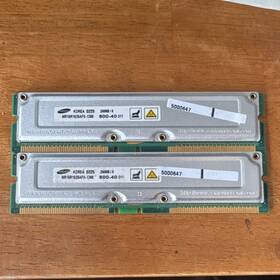
( Brand: Samsung ), ( Manufacturer Part Number: MR16R1628AFO-CM8 ), ( Form Factor: Rimm ), ( Type: Rdram ), ( Total Capacity: 512 Mb ), ( Capacity Per Module: 256 Mb ), ( Number Of Pins: 184 ), ( Bus Speed: Pc-800 )
Review SAMSUNG 512mb Rdram Rimm 2x 256mb Memory Modules
The **Samsung MR16R1628AFO-CM8** is a high-performance, dual-channel memory kit designed to deliver exceptional speed and reliability for demanding computing tasks, making it an ideal choice for users seeking enhanced system responsiveness in mid-range to high-end PCs. This **512MB PC-800 DDR SDRAM** module consists of two **256MB RIMM (Rambus Inline Memory Module)** components, each operating at a robust **1000MHz (PC-800)** transfer rate, ensuring seamless data flow between the CPU and memory. Built with Samsung s proprietary **Rambus DRAM (RDIMM)** technology, these modules are engineered to maximize bandwidth and minimize latency, providing a significant performance boost over traditional DDR configurations. The **CM8** designation indicates compatibility with Intel s **Rambus-based server and workstation platforms**, particularly those utilizing the **Intel 845/850 chipsets** or early Xeon processors, where Rambus memory was a standard for high-end performance. Each module features **low-profile, non-ECC (Error-Correcting Code) memory**, making it suitable for general-purpose applications, though it lacks the fault tolerance of ECC variants. The **512MB capacity** offers a balanced solution for users upgrading from older systems or those running memory-intensive applications like video editing, 3D rendering, or large-scale data processing. With its **low power consumption** and **durable construction**, this memory kit ensures stable operation while maintaining efficiency, making it a practical yet powerful addition to compatible systems. Whether integrated into a **workstation, gaming rig, or enterprise-grade PC**, the Samsung MR16R1628AFO-CM8 delivers a reliable and high-speed memory solution for those who demand performance without compromise.
The **Samsung MR16R1628AFO-CM8** is a pair of 256MB PC-800 DDR SDRAM modules (totaling 512MB) designed for older systems, particularly those using the **RDRAM** (Rambus DRAM) interface. Below is a detailed analysis of its pros and cons, followed by a conclusion and recommendation.
---
### **Pros of buying a Samsung MR16R1628AFO-CM8 (2x 256MB PC-800 RDRAM)**
1. **Compatibility with Older Systems**
- These modules are specifically designed for **Intel 850/845 chipset motherboards** (common in early 2000s PCs like the **Intel P4-based systems**).
- They fit into the **Rambus DRAM (RDRAM) slots**, which were standard in high-end workstations and gaming PCs of that era (e.g., **Intel P4 2.0 GHz, Dell Precision, HP Z-series**).
- If you have a legacy system that requires RDRAM (not DDR or SDRAM), these modules will work without issues.
2. **Reliability and Longevity**
- RDRAM was used in professional and high-performance systems where stability was critical. These modules are likely to be **durable and low-latency** for their intended use.
- Samsung was a reputable manufacturer at the time, so the build quality should be solid.
3. **Easy to Find (If Still Available)**
- While RDRAM is outdated, these modules may still be available in **refurbished or eBay markets**, especially if you re restoring an old system.
- They are **not common in modern markets**, so if you find them at a reasonable price, they may be a good deal.
4. **No Need for Modern Memory Upgrades**
- If you re working with a **very old PC** that cannot use modern DDR3/DDR4, these modules are a **direct replacement** for the original RDRAM kits.
---
### **Cons of buying a Samsung MR16R1628AFO-CM8**
1. **Extremely Limited Use Case**
- **RDRAM is obsolete** modern motherboards (post-2004) do not support it. If you don t have a **specific Intel 850/845-based system**, these modules are **completely useless**.
- Even if you have an old PC, **most modern OSes (Windows 10/11, Linux) will not run efficiently** with such low memory (512MB is **painfully slow** for anything beyond basic tasks).
2. **Low Capacity for Modern Needs**
- **512MB is insufficient** for any meaningful use today. Even **basic web browsing, office work, or light gaming** requires **at least 4GB of RAM**.
- If you re trying to **revive an old system for retro computing**, you ll likely need to **add more RAM** (if possible) or accept severe performance limitations.
3. **High Latency and Poor Performance**
- RDRAM was **known for high latency** compared to DDR SDRAM. While it was fast for its time, **modern standards make it feel sluggish**.
- If you re running **Windows XP or Linux on such a system**, expect **slow boot times, poor multitasking, and high CPU usage** due to memory constraints.
4. **Difficulty in Finding Replacements or Upgrades**
- If these modules fail, **replacing them will be extremely difficult** RDRAM is no longer manufactured.
- If you want to **upgrade later**, you ll need to **switch to a different memory type** (e.g., DDR SDRAM via an adapter, if your motherboard allows it).
5. **Potential Compatibility Issues**
- Some **Intel 850/845 motherboards** had **strict timing requirements** for RDRAM. If the modules are **not exact matches** (e.g., different speeds or brands), they may **not work at all** or cause **instability**.
- **Check your motherboard s supported RDRAM speeds** these modules are **PC-800 (1000MHz)**, which may or may not be compatible with your system.
6. **No Future-Proofing**
- Even if you use these modules in a legacy system, **there is no path to modernizing the hardware** without a full replacement.
- If you plan to **keep the PC for long-term use**, you ll eventually need to **replace the entire motherboard and CPU**.
---
### **Conclusion**
The **Samsung MR16R1628AFO-CM8 (2x 256MB PC-800 RDRAM)** is **only worth buying if you have a specific, high-end Intel 850/845-based system that requires RDRAM and cannot use other memory types**. Even then, **512MB is woefully inadequate** for modern or even basic retro computing needs.
If you re **restoring an old workstation or gaming PC from the early 2000s**, these modules **might** be useful but only if:- You **cannot find a better RDRAM kit** (e.g., 1GB or 2GB).
- You **accept severe performance limitations** (slow boot, poor multitasking).
- You **do not plan to use the system for anything beyond basic tasks**.
For **any other use case**, these modules are **not recommended**. Modern systems require **at least 4GB of DDR3/DDR4 RAM**, and even retro systems benefit from **higher memory capacities** if possible.
---
### **Recommendation**
1. **If you have a specific Intel 850/845 system and need RDRAM:**- **Check eBay, Facebook Marketplace, or legacy hardware forums** for **larger RDRAM kits (1GB or 2GB)** if available.
- If you **must** use these modules, **test them thoroughly** some RDRAM kits are picky about compatibility.
- **Consider adding more RAM later** if your motherboard supports it (though this is rare).
2. **If you re restoring an old PC for retro use:**- **Aim for at least 1GB of RAM** (even if it means mixing RDRAM with other types if possible).
- **Upgrade to a modern CPU/motherboard** if feasible many **Intel Core 2 Duo/Quad-based motherboards** support DDR2 and can run **Windows XP/7 with decent performance**.
- **Use a lightweight OS** (e.g., **Linux, FreeDOS, or a minimal Windows XP install**) to maximize usability.
3. **If you re not sure about compatibility:**- **Check your motherboard s manual** to confirm RDRAM support and exact module requirements.
- **Test the modules in a known-working system** before committing to purchase.
4. **For any modern or near-modern use:**- **Do not buy these modules.** Instead, **invest in a used or refurbished PC with modern RAM** (4GB DDR3/DDR4).
### **Final Verdict:****Only purchase these modules if you have an absolute necessity for them in a legacy Intel 850/845 system.** For everything else, **they are a waste of money and will severely limit your system s usability.** If you re serious about retro computing, **prioritize higher memory capacity and modern compatibility** where possible.
Details:
Samsung MR16R1628AFO-CM8 512MB PC-800 RDRAM RIMM 2x 256MB Memory Modules.
part #: mr16r1628afocm8 prices
- $14.95-$38.24
specifications servermemor:
- brand: Samsung
- mpn: Mr16r1628afo-cm8
- form factor: Rimm
- type: Rdram
- total capacity: 512 Mb
- capacity per module: 256 Mb
- number of pins: 184
- bus speed: Pc-800
returns servermemor:
- policy: No Returns
shipping servermemor:
- type: Calculated
- class: Standard
- transit: 4-11 Days
- cost: $5.52
- service: USPS Ground Advantage
- carrier: USPS
general servermemor:
- Enterprise Networking, Servers > Server Components > Server Memory RAM
- condition: Used
offer servermemor:
- sold: 0
- best offers: True
- started: February 24, 2026
- options: Ship-to-home
- quantity: 2
- availability: In Stock
payments servermemor:
- credit card: Discover
- wallet: Apple-pay
- other
seller servermemor:
- # reviews: 2
- city: Fort Edward, New York
- rating: 100.0%
Samsung MR16R1628AFO-CM8 Is Similar To:
- 0.11338225633667265 Lot Samsung Ecc Server Ram Memory (33.6% similar) Condition: used, working if a power adapter is required for this item, it not included cord shows signs of normal use w some scuffs scratches blemishes sticker residue no other accessories hardware software. I'll get back to you as soon I can...(March 27th, 2018)
- 0.9516050138760368 Samsung Registered Ecc Memory (30% similar) Condition: used, working if a power adapter is required for this item, it not included cord shows signs of normal use w some scuffs scratches blemishes sticker residue no other accessories hardware software. I'll get back to you as soon I can...(May 26th, 2018)
- 00lp726 Ibm Samsung Memory Cdimm Dram For (28.3% similar) Product quality conditions: all of our a mainly used refurbished item so its natural for an to have cosmetic wear and tear on them. Bubble wrap static-bag shipping packing: package star IBM 00LP726 32GB DDR3 1600MHZ memory M351B4G73DB0 comm dram for POWER8 part number Samsung brand power 8 ...(July 12th, 2018)
- 00v5404 Ibm Mmb Server Memory Samsung (29.4% similar) IBM part number: 00V5404 pulled from: 9117MM b server memory 8GB 1KX72 Samsung M396B1K73DH0-YF8M1 from a working environment average used cosmetic condition DOA warranty only what is pictured included. Don't see what you are looking for...(March 24th, 2018)
- 03t7861 Lenovo Lot Of Samsung Server Memory Fru (31.9% similar) Leno Frau 03T7861 memory is clean, tested, and ready to use. This listing is for a 16GB lot of Leno Samsung 2X8GB 1RX4 PC4-2133P server memory. Fast, free shipping...(February 16th, 2019)
- 03t8431 Ibm Samsung Workstation Memory (34.5% similar) Condition is used. Shipped with USPS first class package. Samsung PC3L-10600E 4GB 2RX8 DDR3 workstation memory M391B5273DH0-YH9...(January 22nd, 2019)
- 10x2gb 10600s Elbida Samsung Laptop Ddr3 Hynix Micron Lot Memory (35.3% similar) ...(May 11th, 2015)
- 12541755-16gb Samsung Server Memory (31.8% similar) 35 v no item ships from china include a register for enhancing clock, command and control signals supports x4 x8 organization up to 2 ranks per dim 3DPC configuration error correction available by added 8 bit parity application: server specifications type: rimm FDR capacity: 16GB rank x org. Samsung...(October 6th, 2018)
- 12541759-2-x-16gb Samsung Ecc Registered Server Memory (33.3% similar) 35V DDP1G x 4/3 6 this item ships from china. Samsung 16GB DDR3 PC3-8500R 1066MHZ eccl registered server memory 4RX4 proven dram module solution in the global markets modules are designed for a wide range of applications to deliver best performance with low power requirements. Error correction ...(October 6th, 2018)
- Ddr3 Pc3 240 Samsung 12800 4gb Dimm Ram Pin 1600 Mhz Unbuff Cl11 ecc Memory (37.6% similar) 2 error checking non encumber of MODULES1 x 4 SPEED1600 SIZE4 TECHNOLOGYDDR3 STANDARDDDR3 1600 PC3 width 1...(March 4th, 2015)
- Ddr2 Ram 512mx72 Memory 12r6452 Reg Ecc Pc-4200 Ibm 4gb Mhz Cl4 Samsung 533 (25.9% similar) If you are not sure, ask. Please refer to the offer photographs for reference. There are a few minor scratches dings scuffs on the corners sides, and normal wear and tear. As such, it shows signs of moderate use. 1390THIS item is backed by our 30 day guarantee against failure of components or parts...(May 5th, 2015)