MICRON MT8VDDT6464AG-40BC1 Sdram Dimm Ram Modules Total 2X 512MB DDR1 PC3200 184-PIN CL3 1GB
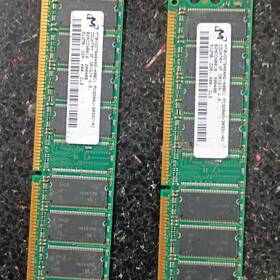
( Brand: Micron ), ( Manufacturer Part Number: MT8VDDT6464AG-40BC1 ), ( Form Factor: Dimm ), ( Type: Ddr1 Sdram ), ( Total Capacity: 1 Gb ), ( Capacity Per Module: 512 Mb ), ( Number Of Pins: 184 ), ( Bus Speed: Pc3200u-30331-a1 Ddr 400 Cl3 )
Review MICRON 2x 512mb Sdram Dimm Pc3200 184-pin Cl3 Ram Modules 1gb Total
The **Micron MT8VDDT6464AG-40BC 2x 512MB DDR1 SDRAM DIMM (1GB total)** is a high-performance, low-latency memory module designed to deliver reliable and efficient data transfer for a wide range of computing applications. Part of Micron s trusted lineup of memory solutions, this **PC3200** (400 MHz) DDR1 module features **two 512MB unbuffered DIMMs** arranged in a dual-channel configuration, offering a total capacity of **1GB** for enhanced system responsiveness. With a **184-pin DIMM form factor**, it is engineered to seamlessly integrate into compatible motherboards, providing a stable and optimized platform for both desktop and server workloads. The module operates at a **CAS latency of CL3**, ensuring faster data access times and improved system performance, particularly in applications that demand quick memory response, such as multimedia editing, gaming, or light server tasks. Built with Micron s advanced manufacturing processes, this memory module guarantees **high-speed data throughput** while maintaining exceptional reliability, making it an ideal choice for users seeking a balance between performance and cost-effectiveness. Whether deployed in a home office, a small business environment, or an entry-level server setup, this module ensures smooth operation and consistent performance, reinforcing Micron s reputation for delivering dependable and high-quality memory solutions.
**Pros and Cons of buying a Micron MT8VDDT6464AG-40BC (2x 512MB DDR1 SDRAM DIMM, PC3200, CL3, 184-pin, 1GB total)**
### **Pros:**1. **Compatibility with Older Systems** DDR1 memory is widely supported in older PCs, motherboards from the early to mid-2000s, and some budget builds. If you re upgrading an older machine, this is a practical choice.
2. **Low Power Consumption** DDR1 operates at lower voltages (typically 2.5V) compared to newer DDR2/DDR3/DDR4, making it more energy-efficient for legacy systems.
3. **Affordability** Since DDR1 is outdated, these modules are often cheaper than modern RAM, offering good value for budget-conscious buyers.
4. **Stability in Legacy Hardware** If your system is already running DDR1, this RAM will integrate seamlessly without compatibility issues.
5. **No Need for Advanced Cooling** Unlike high-capacity DDR3/DDR4 modules, these 512MB sticks don t generate significant heat, reducing thermal management concerns.
### **Cons:**1. **Limited Capacity** At just 1GB total (2x 512MB), this is extremely low by modern standards. Most modern operating systems (even lightweight ones) require at least 4GB for smooth performance.
2. **Performance Bottlenecks** DDR1 runs at 400MHz (PC3200), which is significantly slower than modern DDR standards (e.g., DDR4-3200 ). This will severely limit system performance in any modern application.
3. **No Upgrade Path** If you later need more RAM, you ll likely have to replace the entire module rather than adding additional sticks (most DDR1 motherboards have limited slots).
4. **Obsolete Technology** DDR1 is outdated, meaning no future-proofing. New software, games, or operating systems will struggle to run efficiently, if at all.
5. **Hardware Limitations** Most modern CPUs, motherboards, and GPUs expect at least DDR2 or DDR3. Using DDR1 in a newer system may cause instability or require manual voltage adjustments, which can void warranties.
6. **No Error-Correcting Code (ECC) Support** Unlike some enterprise-grade DDR1 modules, these are likely non-ECC, making them unsuitable for servers or high-reliability applications.
7. **Difficulty Finding Replacements** As DDR1 becomes rarer, sourcing spare parts or upgrades will become increasingly difficult.
### **Conclusion:**This RAM module is best suited for **legacy systems** where DDR1 is the only option, such as very old PCs (e.g., early 2000s Intel/Pentium 4 or AMD Athlon XP systems). For any modern use even basic office tasks this amount and type of RAM will be **severely insufficient**. If you re working with an older machine that absolutely cannot run DDR2/DDR3, this may be a last-resort solution, but expect **extreme performance limitations**.
### **Recommendation:**- **If you re upgrading an older DDR1-only system:** This module is a viable (though limited) choice, but consider whether the system is worth modernizing instead.
- **For any modern use (2010s or later):** Avoid this RAM entirely. Instead, invest in at least **4GB of DDR2/DDR3/DDR4** (depending on your motherboard) to ensure usability.
- **If you re unsure about compatibility:** Check your motherboard s manual to confirm DDR1 support. If it supports DDR2/DDR3, upgrading to a higher-capacity module (even if slightly more expensive) will provide far better long-term value.
- **For future-proofing:** Even if your current system runs DDR1, consider whether it s worth keeping modern operating systems (Windows 10/11, Linux) will struggle with 1GB of RAM.
**Final Verdict:** Only purchase this RAM if you have no other option and are working with a **very old, DDR1-only system**. For everything else, seek a more modern and higher-capacity solution.
Details:
part #: mt8vddt6464ag40bc1 prices
- $10.00-$74.55
specifications servermemor:
- brand: Micron
- mpn: Mt8vddt6464ag-40bc1
- form factor: Dimm
- type: Ddr1 Sdram
- total capacity: 1 Gb
- capacity per module: 512 Mb
- number of pins: 184
- bus speed: Pc3200u-30331-a1 Ddr 400 Cl3
payments servermemor:
- wallet: Apple-pay
- credit card: Discover
- other
offer servermemor:
- best offers: True
- sold: 0
- started: April 19, 2026
- quantity: 1
- availability: In Stock
- options: Ship-to-home
seller servermemor:
- # reviews: 12
- rating: 100.0%
- city: Calera, Alabama
general servermemor:
- Enterprise Networking, Servers > Server Components > Server Memory RAM
- condition: Used
shipping servermemor:
- service: UPS Ground Saver
- carrier: UPS
- cost: $7.76
- class: Economy
- type: Calculated
- transit: 5-11 Days
returns servermemor:
- policy: No Returns
Micron MT8VDDT6464AG-40BC1 Is Similar To:
- 0.20224299680992108 Lot Micron Ecc Server Ram Hp (22.9% similar) I'll get back to you as soon I can. Condition: used, working if a power adapter is required for this item, it not included cord shows signs of normal use w some scuffs scratches blemishes sticker residue no other accessories hardware software...(June 8th, 2018)
- 0.26622135794166435 Lot Micron Ecc Server Ram Memory Dell (26.8% similar) Condition: used, working if a power adapter is required for this item, it not included cord shows signs of normal use w some scuffs scratches blemishes sticker residue no other accessories hardware software. I'll get back to you as soon I can...(June 11th, 2018)
- 0.3483837301561905 Micron Ecc Server Ram Hp (23.7% similar) I'll get back to you as soon I can. Condition: used, working if a power adapter is required for this item, it not included cord shows signs of normal use w some scuffs scratches blemishes sticker residue no other accessories hardware software...(July 17th, 2018)
- 0.36513694130424335 Lot Micron Server Vlp Ram Ibm (24.1% similar) Condition: used, working if a power adapter is required for this item, it not included cord shows signs of normal use w some scuffs scratches blemishes sticker residue no other accessories hardware software. I'll get back to you as soon I can...(October 19th, 2018)
- 0.6896737264585662 Lot Micron Ecc Server Ram Ibm (24.3% similar) I'll get back to you as soon I can. Condition: used, working if a power adapter is required for this item, it not included cord shows signs of normal use w some scuffs scratches blemishes sticker residue no other accessories hardware software...(June 29th, 2018)
- 0.6910968341728292 Lot Micron Ecc Ram (20.2% similar) Condition: used, working if a power adapter is required for this item, it not included cord shows signs of normal use w some scuffs scratches blemishes sticker residue no other accessories hardware software. I'll get back to you as soon I can...(April 4th, 2018)
- 0.7963132840829785 Lot Micron Mhz Ecc Reg Ram Hp (22.9% similar) Condition: used, working if a power adapter is required for this item, it not included cord shows signs of normal use w some scuffs scratches blemishes sticker residue no other accessories hardware software. I'll get back to you as soon I can...(May 16th, 2018)
- 0.8117968287077875 Lot Micron Ecc Server Ram Ibm (24.3% similar) I'll get back to you as soon I can. Condition: used, working if a power adapter is required for this item, it not included cord shows signs of normal use w some scuffs scratches blemishes sticker residue no other accessories hardware software...(June 30th, 2018)
- 0.9709607809767642 Samsung Micron Server Vlp Ram Ibm (23.6% similar) I'll get back to you as soon I can. Condition: used, working if a power adapter is required for this item, it not included cord shows signs of normal use w some scuffs scratches blemishes sticker residue no other accessories hardware software...(October 20th, 2018)
- 011110364630 Micron Ram 16gb Ddr4 (24% similar) ...(June 30th, 2017)
- 011110380166 Micron Ram 8gb Ddr4 (24.2% similar) We either re-use, refurbish, re-sell or properly recycle your outdated it equipment. Need product support. Byte has you covered...(June 23rd, 2017)