BTO SJ20200518002 Sdram Dimm Ram 32GB 2RX8S DDR3L PC3L-1600 4X 8GB 240-PIN
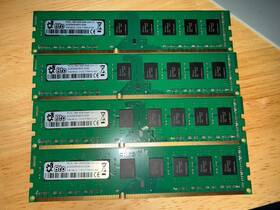
( Brand: Bto ), ( Manufacturer Part Number: SJ20200518002 ), ( Form Factor: Dimm ), ( Type: Ddr3l Sdram ), ( Total Capacity: 32 Gb ), ( Capacity Per Module: 8 Gb ), ( Number Of Pins: 240 ), ( Bus Speed: Pc3l-1600 ), ( Memory Features: 2rx8 )
Review BTO Sdram Dimm 4x 8gb Ram 240-pin
The **BTO SJ20200518002 DDR3L SDRAM DIMM (PC3L-1600)** is a high-performance, low-power memory module designed to deliver exceptional reliability and efficiency in demanding computing environments. This **32GB (4x 8GB) 2Rx8 configuration** consists of four individual **240-pin DDR3L SODIMM modules**, each featuring a **2-rank (2Rx) x 8-bit** architecture, ensuring optimal data throughput and stability. Built with **low-voltage DDR3L (1.35V) technology**, this module is engineered to minimize power consumption while maintaining peak performance, making it an ideal choice for power-sensitive systems such as servers, workstations, and high-end desktops where energy efficiency is critical.
Operating at a **PC3L-1600 (DDR3L-1600) speed rating**, this memory module achieves a **6400 MT/s (Megatransfers per second) data transfer rate**, enabling faster data processing and reduced latency for applications requiring high-speed memory access. The **2Rx8 configuration** balances speed and capacity, providing a robust solution for multi-channel memory setups where redundancy and performance are prioritized. Each module is meticulously crafted with **high-quality DRAM chips**, ensuring long-term durability, consistent performance, and resistance to thermal fluctuations, which is particularly beneficial in sustained workload environments.
Ideal for **enterprise-grade systems, gaming rigs, and professional workstations**, this memory module supports **ECC (Error-Correcting Code) compatibility**, though it is not inherently ECC-certified users should verify system compatibility to leverage this feature. The **240-pin SODIMM form factor** ensures seamless integration into a wide range of motherboards, including those found in high-end desktops, mini-ITX builds, and specialized server configurations. Whether deployed in a **dual-channel or quad-channel setup**, this module maximizes memory bandwidth, enhancing overall system responsiveness and multitasking capabilities.
For IT administrators and enthusiasts seeking a **future-proof, high-capacity solution**, the **32GB capacity** provides ample room for memory-intensive applications, including virtualization, database management, and high-resolution multimedia editing. The **low-power DDR3L specification** further extends the lifespan of power supplies and reduces operational costs in data centers or always-on systems. With its **reliable construction and optimized performance**, the **BTO SJ20200518002 DDR3L SDRAM module** stands as a versatile and efficient upgrade for any system requiring a balance of speed, capacity, and energy efficiency.
### **Pros and Cons of Buying BTO (Build-to-Order) SJ20200518002 DDR3L SDRAM DIMM (PC3L-1600, 32GB, 4x8GB, 2Rx8, 240-pin)**
#### **Pros:**1. **High Capacity and Scalability** The 32GB (4x8GB) configuration provides ample memory for demanding workloads, including gaming, content creation, or server applications. If you plan to upgrade later, you can add more DDR3L modules to the same socket (assuming your motherboard supports it).
2. **Low Power Consumption (DDR3L)** DDR3L (Low Voltage) modules operate at 1.35V instead of the standard 1.5V, reducing power draw and heat generation. This is beneficial for systems with limited cooling or power efficiency concerns.
3. **Reliability and Stability** DDR3L is a mature technology with widespread compatibility, making it less prone to instability issues compared to newer, less-tested memory types. It is well-suited for older or budget-friendly systems that may not support DDR4.
4. **Cost-Effective for Bulk Memory** For users who need large amounts of RAM (e.g., virtualization, database servers, or workstations), buying in bulk (like this 32GB kit) can be cheaper per GB than smaller modules.
5. **Compatibility with Older Systems** If you are upgrading an older motherboard or CPU (e.g., Intel Xeon, Core i5/i7 Sandy Bridge, Ivy Bridge, or AMD FX series), DDR3L is a practical choice since newer systems typically use DDR4.
6. **Low Latency (PC3L-1600)** The PC3L-1600 (1600MHz) speed is optimized for DDR3L, offering a balance between performance and power efficiency. While not as fast as DDR4, it is sufficient for many applications.
7. **2Rx8 Configuration** The 2Rx8 (2-rank, 8GB per module) setup provides better bandwidth and performance than single-rank modules, reducing latency in multi-threaded tasks.
---
#### **Cons:**1. **Outdated Technology** DDR3 was released in 2007, and DDR3L is even older. Newer systems (DDR4/DDR5) offer higher speeds, lower power consumption, and better efficiency. If you are building a modern PC, DDR3L may limit future upgrades.
2. **Limited Availability and Support** DDR3L modules are less commonly produced compared to DDR4, which could make replacements or upgrades harder to find in the future. Some newer motherboards may not even support DDR3L.
3. **Lower Bandwidth Than DDR4/DDR5** DDR3L maxes out at 1600MHz (PC3L-1600), whereas DDR4 can reach 3200MHz and DDR5 even higher. This means slower data transfer rates, which could bottleneck performance in modern applications.
4. **Higher Power Draw Than DDR5** While DDR3L is more power-efficient than standard DDR3, it still consumes more power than DDR5, which is optimized for low power in modern systems.
5. **No ECC Support in Consumer Kits** Most consumer-grade DDR3L modules (like this one) do not include ECC (Error-Correcting Code) memory, which is critical for servers or professional workloads requiring data integrity. ECC versions are typically more expensive and may not be available in bulk kits.
6. **Heat and Cooling Considerations** Older DDR3 modules can generate more heat than DDR4/DDR5, especially in high-density configurations. Ensure your system has adequate cooling if running multiple modules.
7. **Potential Compatibility Issues** Some newer motherboards (even those with DDR3 support) may have stricter timing or voltage requirements. Always verify compatibility with your specific motherboard and BIOS settings.
---
### **Conclusion:** This **32GB DDR3L (PC3L-1600) kit** is a solid choice if you are:- Upgrading an **older system** (Intel Xeon, Core i5/i7 Sandy Bridge/Ivy Bridge, or AMD FX series).
- Running **memory-intensive applications** (e.g., virtualization, databases, or legacy software) where bulk RAM is more important than raw speed.
- Working within a **budget constraint** and prioritizing cost efficiency over cutting-edge performance.
- Certain you **won t upgrade to DDR4/DDR5** in the near future, as DDR3L may become obsolete.
However, if you are building a **modern PC** (especially with a newer CPU or motherboard), investing in **DDR4 or DDR5** would be more future-proof, despite the higher upfront cost. DDR3L is best suited for **legacy systems, servers, or specialized workloads** where compatibility and power efficiency are priorities over raw performance.
---
### **Recommendation:** - **Buy this kit if:**- You are maintaining or upgrading an **older system** that only supports DDR3.
- You need **large amounts of RAM** for a specific use case (e.g., virtualization, media editing, or database servers).
- You cannot afford or do not need the latest DDR4/DDR5 technology.
- **Avoid this kit if:**- You are building a **new PC** and can use DDR4 or DDR5 instead.
- You require **ECC memory** for data integrity (look for server-grade DDR3L modules).
- You plan to **upgrade your CPU/motherboard** in the near future, as DDR3L may not be supported.
- You prioritize **speed and efficiency** over legacy compatibility.
For most **new builds**, prioritize **DDR4 (e.g., 3200MHz or higher) or DDR5** for better long-term performance. However, if you are locked into a DDR3-only system, this kit is a practical and cost-effective solution.
Details:
Bto DDR3L SDRAM DIMM PC3L-1600 32GB 4x 8GB 2Rx8 RAM 240-Pin.
part #: sj20200518002 prices
- $18.00-$179.99
specifications servermemor:
- brand: Bto
- mpn: Sj20200518002
- form factor: Dimm
- type: Ddr3l Sdram
- total capacity: 32 Gb
- capacity per module: 8 Gb
- number of pins: 240
- bus speed: Pc3l-1600
- memory features: 2rx8
general servermemor:
- condition: Used
- Enterprise Networking, Servers > Server Components > Server Memory RAM
seller servermemor:
- rating: 100.0%
- city: Pittsburgh, Pennsylvania
- # reviews: 2
payments servermemor:
- credit card: Discover
- wallet: Paypal
- other
shipping servermemor:
- cost: $19.44
- transit: 3-8 Days
- class: Standard
- carrier: FedEx
- type: Calculated
- service: FedEx Ground / FedEx Home Delivery
offer servermemor:
- availability: In Stock
- sold: 0
- quantity: 1
- started: March 31, 2026
- options: Ship-to-home
returns servermemor:
- policy: No Returns
Bto SJ20200518002 Is Similar To:
- 838085-b21 Hpe Iss Bto New Smartmemory Sdram Memory Module 889894399533 (27.8% similar) Standard shipping service may not be available to some addresses. This extensive testing ensures that hep server memory is completely compatible with and optimized for servers. Please excuse any image and typographical errors. Smart memory 64GB DDR4 sdram memory module ram 4RX4 PC4-2666V-L smart KIA...(April 23rd, 2018)
- 879507-b21 Hpe Iss Bto New Sdram Memory Module Ram 190017199764 (27.9% similar) Unlike third-party alternatives, hep standard memory is sourced from the highest-quality drams and undergoes a rigorous testing authentication process. Hep standard memory options are designed to deliver performance, reliability and efficiency at an affordable price. With hep DDR4 standard memory, ...(January 1st, 2019)