MICRON MTA16ATF2G64HZ-2G1A1 Sodimm Laptop Memory DDR4-2133P
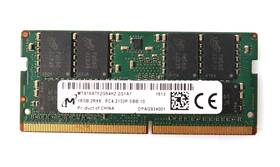
( Brand: Micron ), ( Manufacturer Part Number: MTA16ATF2G64HZ-2G1A1 ), ( Type: Ddr4 ), ( Country Of Origin: United States )
Review MICRON 16gb Ddr4-2133p Sodimm Laptop Memory
The **Micron MTA16ATF2G64HZ-2G1A1** is a high-performance **2GB DDR4 SODIMM memory module** designed specifically for modern laptops and ultrabooks, delivering reliable speed and efficiency for demanding applications. Engineered with Micron s proprietary **2133MHz DDR4 technology**, this low-profile SODIMM (Small Outline Dual In-line Memory Module) module operates at a clock speed of **2133MHz**, ensuring faster data transfer rates and smoother multitasking for tasks ranging from everyday productivity to light gaming and content creation. With a **2GB capacity**, it provides a solid foundation for systems requiring additional memory, though it is best suited for older or budget-friendly laptops where higher capacities may not be necessary. The module adheres to **DDR4-2133 specifications**, featuring a **204-pin SODIMM form factor** that fits seamlessly into compatible motherboards, making it an ideal upgrade for laptops with limited memory slots or those needing a cost-effective boost in performance.
Built with Micron s reputation for quality and stability, this memory module incorporates **low-power consumption** and **low-voltage operation**, making it energy-efficient and suitable for laptops with thermal constraints. The **2G1A1** designation indicates a **2GB single-rank module with a 16-bit data bus**, which simplifies installation and reduces the risk of compatibility issues, particularly in systems with single-channel memory architectures. While not the highest capacity option available, this module excels in providing **consistent performance** for everyday computing, including web browsing, document editing, and media playback, without the need for overclocking or advanced cooling solutions. Its compact design ensures compatibility with a wide range of ultra-thin and lightweight laptops, where space and power efficiency are critical considerations.
For users looking to extend the lifespan of their laptop or enhance its multitasking capabilities without breaking the bank, the **Micron MTA16ATF2G64HZ-2G1A1** offers a **reliable, no-frills solution** that balances affordability with functional performance. Whether used as a standalone module or paired with existing memory in a dual-channel setup (if supported by the system), it delivers **predictable speed and responsiveness**, ensuring that users can rely on their laptop for both work and leisure without encountering memory-related bottlenecks. Micron s commitment to durability and compatibility further reinforces its value as a **practical upgrade** for those seeking to optimize their laptop s performance without investing in high-end, high-capacity alternatives.
**Pros and Cons of Buying Micron MTA16ATF2G64HZ-2G1A1 (DDR4-2133MHz SODIMM Laptop Memory)**
### **Pros**
1. **Compatibility with a Wide Range of Laptops** This is a standard DDR4 SODIMM module (204-pin) with a capacity of 2GB, making it suitable for many mid-range to older laptops that support DDR4 memory. It is particularly useful for systems that originally shipped with 2GB or 4GB configurations but require an upgrade.
2. **Reliable Brand** Micron is a well-established manufacturer known for producing high-quality memory modules. Their products are widely trusted for stability and longevity, reducing the risk of failure compared to lesser-known brands.
3. **Standard Speed (DDR4-2133MHz)** While not the fastest available (modern laptops often use DDR4-3200 or DDR5), 2133MHz is sufficient for basic tasks like web browsing, office work, light multitasking, and older applications. It won t bottleneck modern software but will work reliably in systems where higher speeds aren t necessary.
4. **Low Power Consumption** DDR4 modules are energy-efficient compared to older DDR3, which can be beneficial for battery life in laptops that support it.
5. **Easy to Install** SODIMMs are designed for laptops, and this module is a single-rank (single-sided) chip, making it straightforward to install without requiring advanced technical skills.
6. **Affordable Upgrade Option** For laptops where memory is soldered or where only expensive proprietary modules are available, this is a cost-effective way to add capacity. It s often cheaper than buying a new laptop with more memory.
7. **Future-Proofing (Limited)** While not future-proof for high-end tasks, upgrading to 2GB can extend the usable life of a laptop for basic productivity needs before a full replacement is necessary.
---
### **Cons**
1. **Low Capacity (2GB)** This module only adds 2GB of RAM, which is insufficient for modern multitasking, content creation, or running demanding applications (e.g., video editing, gaming, or virtual machines). Adding just 2GB may not significantly improve performance in most cases.
2. **Not a Full Upgrade Solution** If your laptop originally had 2GB and you add another 2GB, you ll still only have 4GB total, which is the minimum recommended for smooth operation in 2024. Many applications (e.g., Chrome, Photoshop, or Zoom) will struggle with 4GB, leading to slowdowns or crashes.
3. **Speed Limitations** DDR4-2133MHz is slower than modern standards (DDR4-3200 or DDR5), which can become a bottleneck in systems that support higher speeds. If your laptop s memory slots are set to run at 2133MHz, upgrading to faster RAM won t help.
4. **Potential for Mixed-Speed Kits** If your laptop has two slots and one already has a faster module (e.g., 2400MHz), adding a 2133MHz module may force the system to run at the slower speed, negating any performance benefits.
5. **Laptop-Specific Limitations** Some laptops (especially gaming or high-performance models) use proprietary memory configurations (e.g., soldered RAM, non-standard SODIMMs, or DDR5). This module is unlikely to work in those cases, so always verify compatibility with your laptop s model.
6. **No Error Correction (ECC)** This is a non-ECC module, meaning it lacks error-checking capabilities. While rare, memory errors can occur over time, and without ECC, the system may crash or corrupt data silently.
7. **Outdated Technology** DDR4 is being phased out in favor of DDR5 in newer laptops. If you re planning to keep the laptop long-term, investing in DDR5-compatible memory (if available) might be more future-proof, though it s more expensive.
---
### **Conclusion**
The **Micron MTA16ATF2G64HZ-2G1A1** is a practical choice if:- Your laptop has a single 2GB SODIMM and you need to add capacity for basic use (e.g., upgrading from 2GB to 4GB).
- You re working with an older laptop where DDR4-2133MHz is the only supported speed.
- You re on a tight budget and need a reliable, low-cost upgrade.
However, it is **not ideal** if:- You need to run modern applications, multitask heavily, or use virtualization.
- Your laptop already has a faster memory module, as it will limit performance.
- You re looking to future-proof your system for several years.
---
### **Recommendation**
1. **Check Your Laptop s Memory Configuration First**
- Use tools like **CPU-Z** (Windows) or **System Information** (macOS/Linux) to confirm:- Whether your laptop supports DDR4 SODIMMs.
- The current memory speed and capacity.
- If the slots are populated (some laptops have one slot soldered).
- If your laptop has two slots and only one is empty, adding a 2GB module may not be worth it unless you re upgrading from 0GB (unlikely).
2. **Consider a Larger Capacity Module**
- If you can afford it, buy a **4GB or 8GB DDR4 SODIMM** (e.g., Micron MTA16ATF4G64AZ-2G1A1 for 4GB) to reach a more usable total (e.g., 4GB 4GB 8GB). This will provide better performance for everyday tasks.
3. **Prioritize Speed if Possible**
- If your laptop supports it, opt for a **DDR4-2400MHz or DDR4-3200MHz** module (e.g., Micron MTA16ATF4G64AZ-2G1A2 for 4GB DDR4-2400). Even if the speed doesn t change system-wide, it may help in some applications.
4. **Verify Compatibility with Your Laptop Model**
- Check Micron s compatibility database (https://www.micron.com/products/memory-modules) or your laptop manufacturer s support site to ensure the module fits physically and is supported.
5. **Alternative Solutions**
- If your laptop has **soldered RAM**, upgrading may not be possible, and you might need to consider a new laptop.
- If you re using a **gaming or high-end laptop**, DDR4 SODIMMs are unlikely to be an option, and you d need to check for proprietary upgrades (e.g., Corsair Vengeance RGB modules for some Dell/HP models).
6. **Final Verdict**
- **Buy this module only if:**- You re upgrading from 0GB or 1GB to 2GB (extremely rare).
- Your laptop s memory is stuck at 2133MHz and you need to add capacity for very basic use.
- You re on a very tight budget and can t afford a larger module.
- **Avoid this module if:**- You need more than 4GB total for modern workloads.
- Your laptop already has a faster memory module.
- You re looking to upgrade for long-term use (consider DDR5 if available).
For most users, a **4GB or 8GB DDR4 SODIMM** (if compatible) would be a far better investment, even if it means spending slightly more. If you re unsure, consult your laptop s manual or a technician before purchasing.
Details:
Parts not included: User Guide. Physical condition: Great. Working condition: Pulled from a working computer.: Product Condition.
1x 16GB Micron MTA16ATF2G64HZ-2G1A1 PC4-2133P Laptop Memory. Form Factor: SODIMM. Similar item is shown in the photos. Speed: 2133MHz.
Capacity Per Module: 16GB.
part #: mta16atf2g64hz2g1a1 prices
- $54.99-$195.65
specifications servermemor:
- brand: Micron
- mpn: Mta16atf2g64hz-2g1a1
- type: Ddr4
- country of origin: United States
general servermemor:
- Enterprise Networking, Servers > Server Components > Server Memory RAM
- condition: Used
seller servermemor:
- # reviews: 41973
- city: Bell, California
- rating: 99.8%
returns servermemor:
- policy: Returns Accepted
- paid by: Buyer
- method: Money back
- time: 60 Days
shipping servermemor:
- cost: $0.00
- class: Standard
- transit: 4-11 Days
- service: Standard
- type: Fixed
payments servermemor:
- other
- wallet: Paypal
- credit card: Mastercard
offer servermemor:
- started: June 12, 2026
- availability: In Stock
- options: Ship-to-home
- sold: 0
- quantity: 1
- best offers: True
Micron MTA16ATF2G64HZ-2G1A1 Is Similar To:
- 0.26622135794166435 Lot Micron Ecc Server Ram Memory Dell (29.8% similar) Condition: used, working if a power adapter is required for this item, it not included cord shows signs of normal use w some scuffs scratches blemishes sticker residue no other accessories hardware software. I'll get back to you as soon I can...(June 11th, 2018)
- 0.6842008029848028 Lot Micron Server Ecc Memory Hp (28.1% similar) Condition: used, working if a power adapter is required for this item, it not included cord shows signs of normal use w some scuffs scratches blemishes sticker residue no other accessories hardware software. I'll get back to you as soon I can...(June 18th, 2018)
- 098378959419 Undisclosed Micron Memory (25.5% similar) We back this testing up with a 30 day guarantee. Please with any questions or concerns. Brand: Micron model: MTA18ASF2G72AZ-2G3B1ZG form factor: desktop PC memory size: 16GB DDR4 PC4-2400T condition: pre-owned used, tested and working electronic source inspects tests each stick of ram to make sure ...(May 24th, 2018)
- 100-562-479 Micron Ecc Reg Server Memory Ram (33.3% similar) The pictures above accurately illustrate units being sold, please examine them before purchase. 25NSCASCL11DATA transfer RATE1600MHZMEMORY CLOCK200MHZRANKRANK 2 voltage 1. This is a tested working, clean, ecm Micron 16GB 2 x 8GB 2RX4 PC3-12800R DDR3 pin server memory kit. These dims are not ...(October 5th, 2018)
- 10x2gb 10600s Elbida Samsung Laptop Ddr3 Hynix Micron Lot Memory (35.9% similar) ...(May 11th, 2015)
- 16g3ersld4160b.36fn Micron Server Memory (28.8% similar) Need it fast. Listed shipping charges including free are for the continental us only...(October 12th, 2018)
- 18jsf25672az-1g4f1 Micron Ecc Ram Memory Gb (29.9% similar) Be sure you research ahead of time what your system needs to compatible with this and that know the procedure for adding. Also be sure your motherboard will accept the total gb. Buyer pays I tested these again after they were pulled, as a double check. Please research this part number, pay attention...(July 31st, 2018)
- Memory Dimm Cache Edo 20-49653-07 Hp Compaq 128mb Ecc 228470-002 Micron (8.9% similar) Item comes packaged in anti static begot ensure no static damage is made during shipping. Hp Compaq Micron 128MB dimm EDP eccl cache memory pulled out from working server environment and tested...(February 27th, 2015)
- 370-5565 Sun Microsystems Memory Kit Match Micron Tech (23.7% similar) Sun 512MB 2X256MB memory kit X7402A X2EACH match Micron tech test pass by expert technician. Questions?: please feel free to upon any questions or request...(March 4th, 2019)
- Ecc 371-1097-01 Ram Ddr Micron 8x2gb Memory 16gb Pc3200 400mhz Sun Server (24.8% similar) Shipping buyer pays for all shipping costs. Comes in non original packaging. Warranty this item is guaranteed to be as described. Manufacturer Micron condition used. No testing was performed. Doug deals is an ISO and OHSA's registered company. Notes the server memory was pulled from a working ...(February 22nd, 2015)
- 38l6043 Micron Crucial Memory (36.6% similar) 16GB 8 x 2GB PC2-5300P h0 eccl, registered Micron crucial memory...(September 10th, 2018)